
Samsung introduced a Grammarly-powered text correction feature for the Samsung keyboard in One UI 4 (Android 12) that resulted in issues editing content in some applications. With the rollout of One UI 5 (Android 13), that feature is now enabled by default, and results in severe issues in a wide range of applications.
The issues occur when editing text, where any of the following may occur:
Blank lines added when tapping in editable content to open the keyboard
Duplicated content when tapping or typing
All - or some - content getting deleted when tapping or typing
Images - or other non-text content - in editable inputs being replaced with strange characters
As of version 3.63, Amplenote disables all predictive text input when using the Samsung keyboard on Android 13 to prevent the corruption of content. This is inconvenient, as it disables swipe-to-type, spelling correction, and the word prediction bar above the keyboard, but completely resolves all content corruption issues.
linkWorkarounds
In all affected applications, disabling the "Suggest text corrections" feature of the Samsung keyboard - either for the specific application, or entirely - will completely resolve the issue.
The setting can be found by opening the keyboard settings (press the gear icon at the right of the keyboard bar) and selecting "Suggest text corrections":
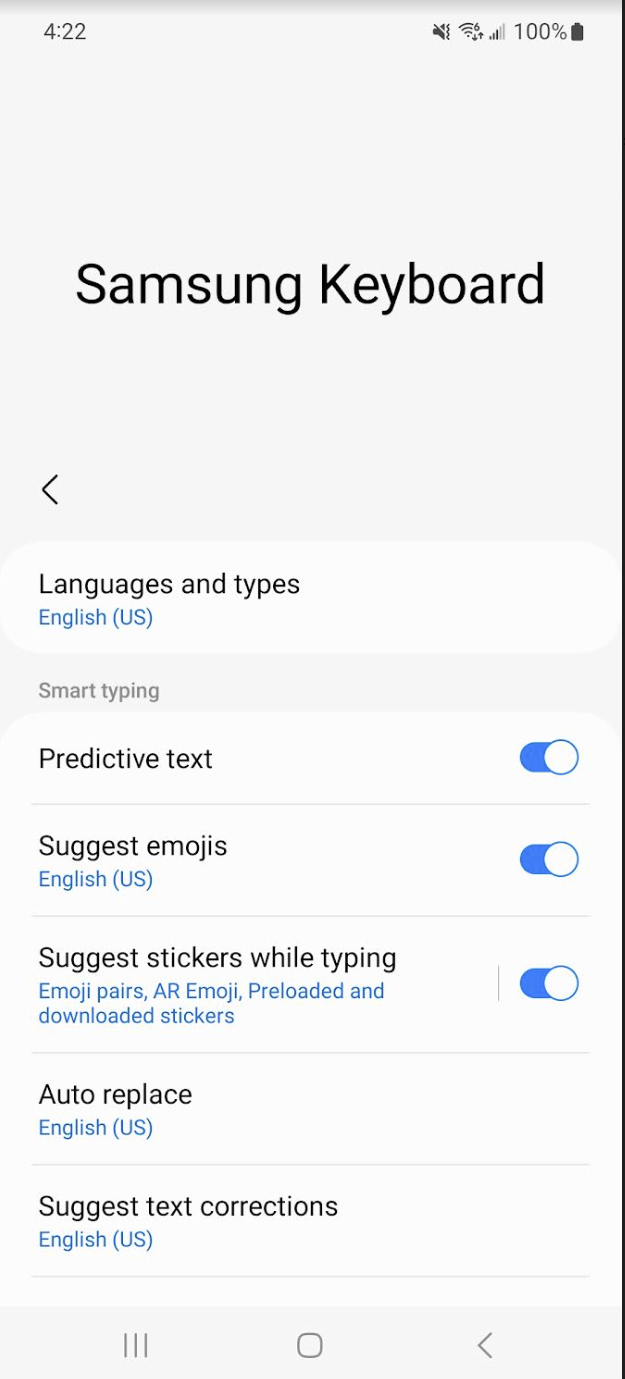
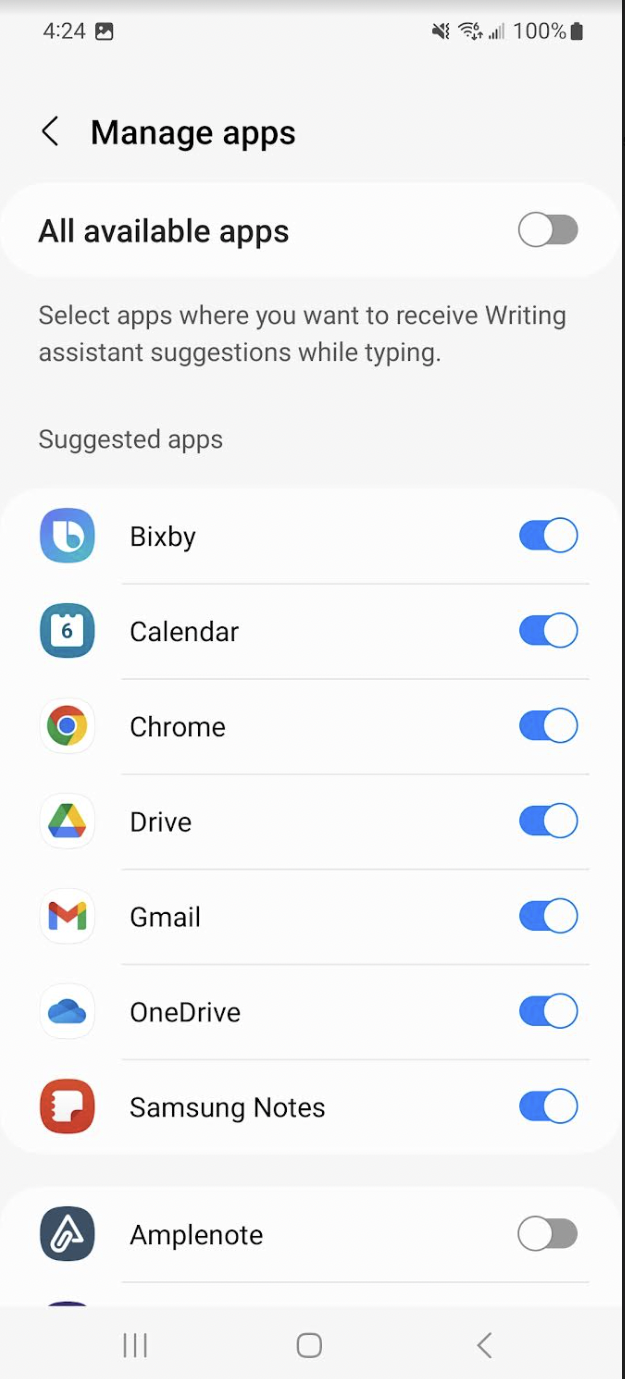
Then, either disable the setting entirely, or press "Manage apps" to disable the feature for the specific application it is affecting:
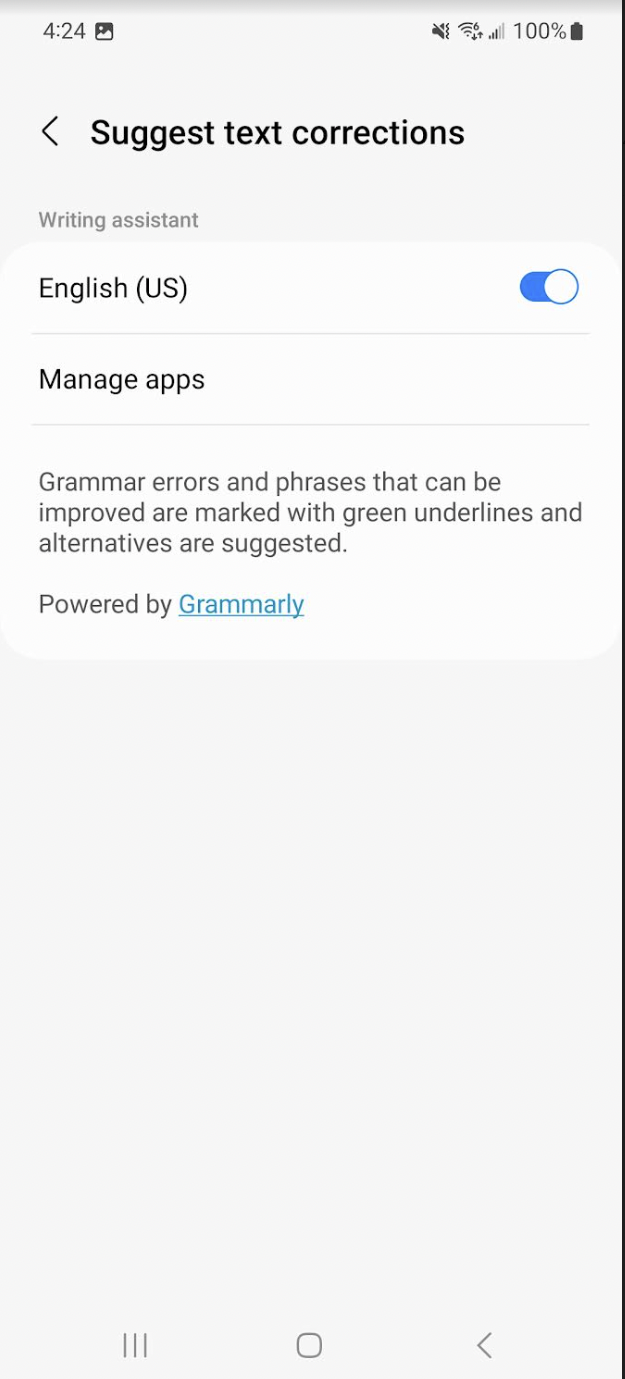
As shown here, the setting is disabled for a single application. That application will no longer have issues.
Alternatively, you can use a different keyboard, like GBoard.
Install the GBoard app on Google Play
Open GBoard, and press the "Enable in settings" button.
Press the switch next to GBoard to enable it.
Press the "Default keyboard" option and select GBoard as the default keyboard.
linkAffected applications
This is a partial list of applications and libraries (used in various applications) that are experiencing these issues with this feature of the Samsung keyboard in Android 13.
Amplenote
This list only includes applications or libraries that have reported data corruption due to the Samsung keyboard. It does not include those that have reported performance issues that have also been introduced with the rollout of this feature, causing some applications to freeze entirely unless "Suggest text corrections" is disabled in the Samsung keyboard settings.
linkTechnical considerations
The main commonality among most applications experiencing this issue is that they contain their editor in a native WebView component. At least two affected applications use editors based on contentEditable HTML elements within that WebView.
What appears to happen, in cases where simply tapping to place the focus in an editor (and bring up the keyboard) results in the content being changed, is that all content is first selected, then it is replaced with a plain text version of (typically) the same content that has additional newlines added. How this change is interpreted varies from application to application, resulting in some differences in how the issue appears to manifest.
From an application's standpoint, this is imperceptible from the user performing a select-all and paste (or rather, sudden mass input) of text, so remediation at that level is extremely difficult, if not impossible. A custom (native) input handler for the WebView can potentially determine what is happening and attempt to handle it, but that is error-prone as there are a huge number of cases that need to be handled correctly.