---
name: Rich Footnotes and content previews
published: Tue, 17 Nov 2020 19:19:15 GMT
updated: Mon, 03 Aug 2026 17:18:25 GMT
---
Rich Footnotes are a feature that lets Amplenote users imbue **text** with [**context**][^1].
\
**You might like:** this video explaining the various kinds of rich footnotes:
\
Any word, any sentence can be transformed from the usual 2d "word on a page" into "[writing in 3d,"](https://youtu.be/bgYUZ53DMjo?si=NsXjlpu2MSMYsNJj&t=74) as we describe Rich Footnotes to our visual-thinking audience. ["Writing in 3d" with Rich Footnotes](https://www.amplenote.com/blog/writing_in_3d_how_the_writing_method_impacts_thinking) means you can capture more thoughts, even when you're being bombarded with ideas from many directions.
\
# What Goes In Rich Footnotes?
As you can see by clicking any of these list items, Rich Footnotes can imbue plain text (and by extension, text in Amplenote tasks and calendar events) with all sorts of extra meaning:
- [🖼️ Image][^2]
- [📽️ Mp4 video]()
- [🔡 Text][^3]
- [🖇️ Links](https://www.amplenote.com/blog)
- [🤩 Youtube video](https://www.youtube.com/watch?v=Q_050nEIMqw)
- [🐦 Tweet](https://twitter.com/amplenote/status/1326973995191848963)
- [📄 Google Sheet](https://docs.google.com/spreadsheets/d/1Iv357u8XZ6OQfgZwxiByCrHI4oPuZY7d5K4j1qytC0M/edit?usp=sharing)
- [👀 Preview of another note](https://public.amplenote.com/vYH5vFT1kjNkDoiDW8biNaa8)
- [🕺 A combination thereof][^4]
- 📫 [Email addresses](mailto:hello@amplenote.com)
\
Given their range of versatility, Rich Footnotes can often replace the need to create and jump between multiple notes.
\
# Use Cases
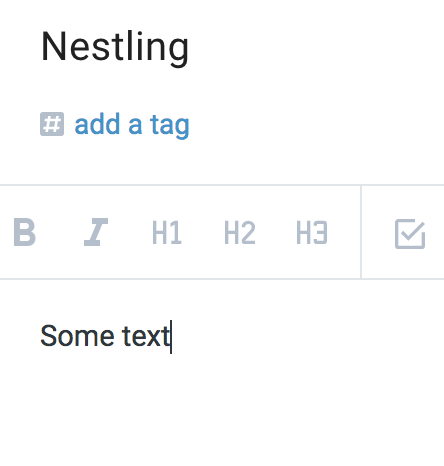
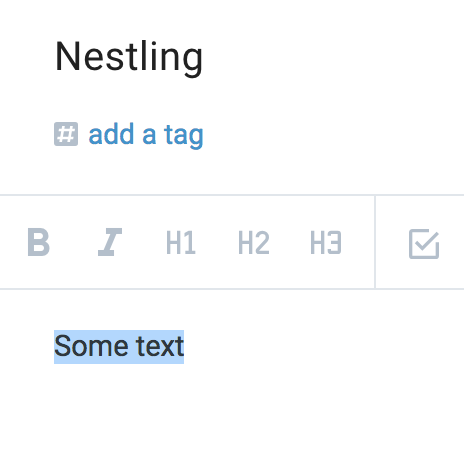
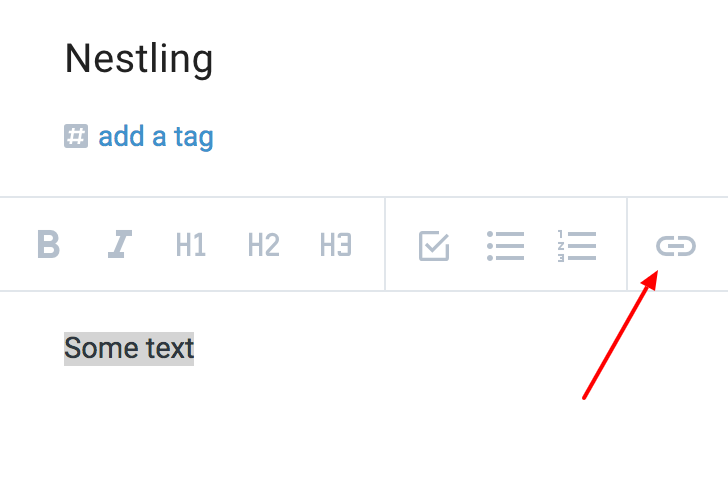
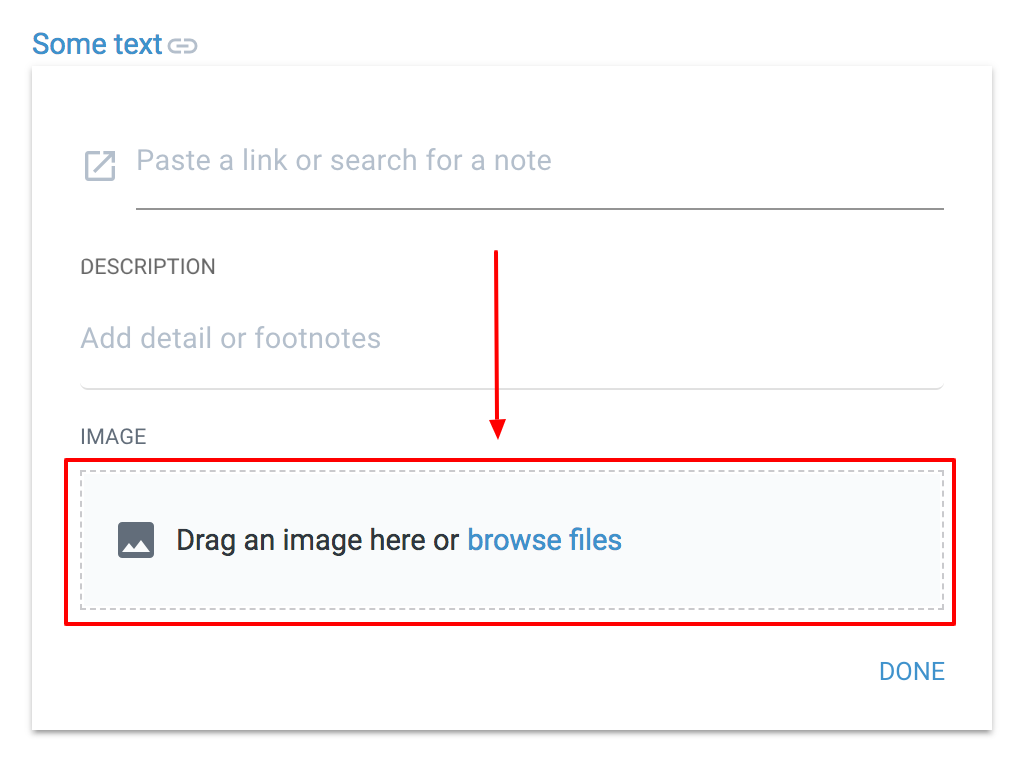
- **Instructions for peers**: If you'd like to try nestling a picture for yourself: [open a note][^5], [type some text][^6], [highlight it][^7], [click the link icon][^8], and [upload your picture][^9]. [Voila][^10]! What would've otherwise been a page of instructions & pictures is instead one sentence*.*
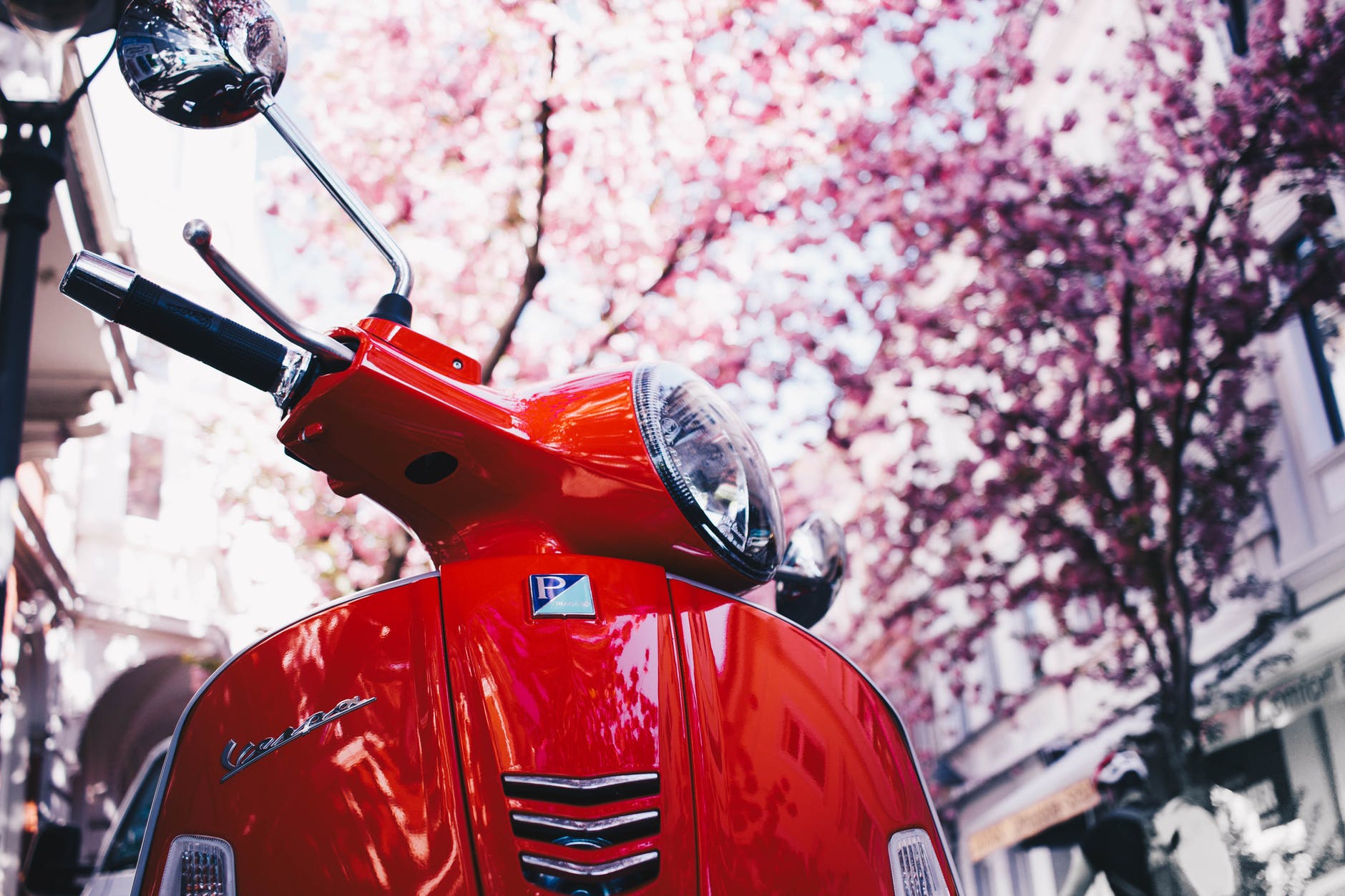
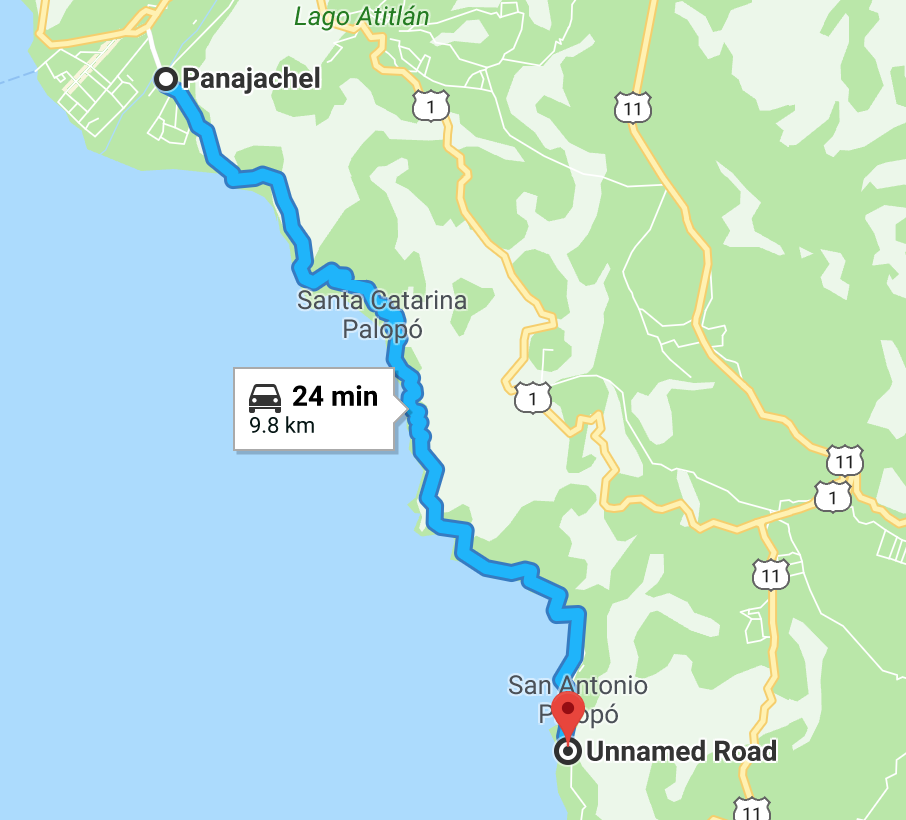
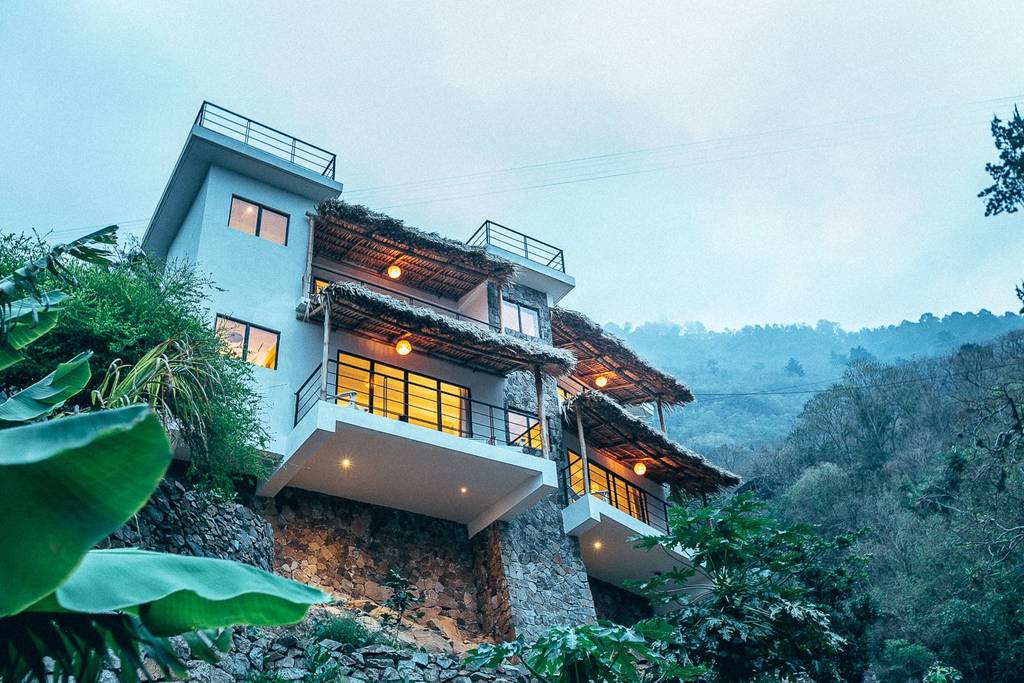
- **Vacation planning**: [Amazing Lakefront Villa](https://www.airbnb.com/rooms/12862968?location=Lake%20Atitl%C3%A1n%2C%20Solola%2C%20Guatemala&adults=10&check_in=2019-02-19&s=rJWiMqts&guests=10&check_out=2019-02-28) in San Antonio Palopo ⭐⭐⭐⭐⭐ *$80/room*. 5 br. [The pics say it all][^11] . Getting here requires "20 minutes from Pana" according to listing, looks more like [25 min tuk tuk][^12], or [3 hour walk][^13]. [Built into rock wall][^14].
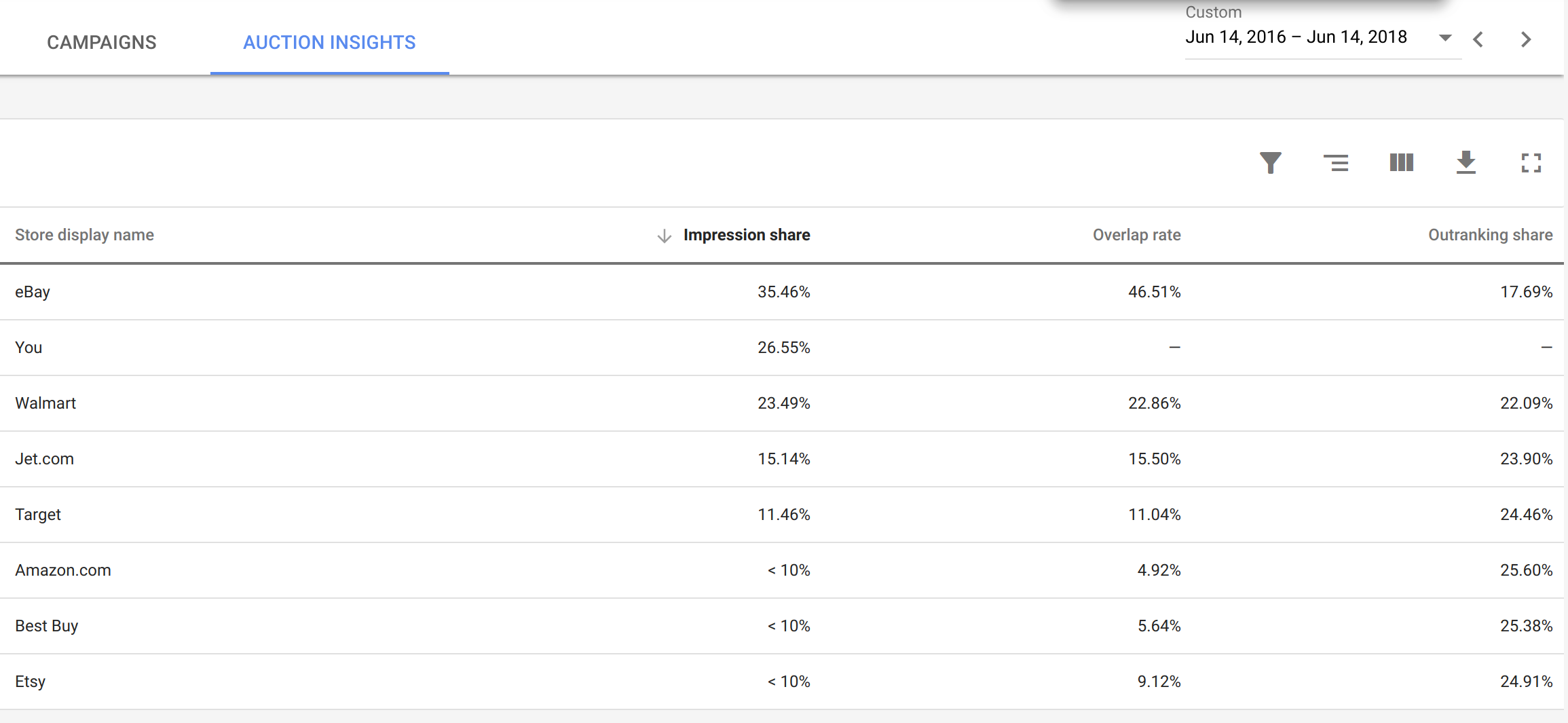
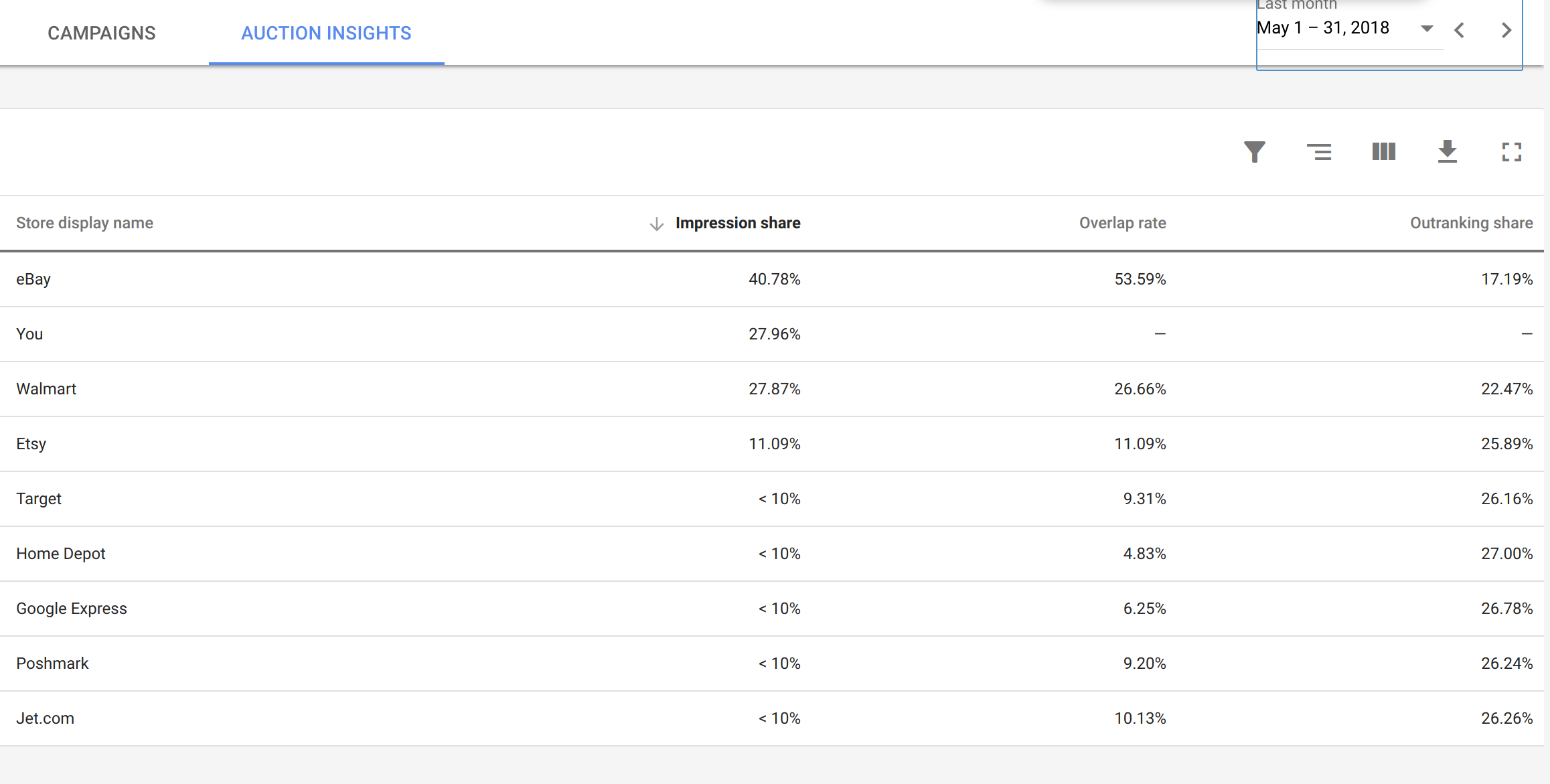
- **Work research**: [Two year impression shares][^15] vs [last month impression][^16] shares indicate eBay is up 5%. [Searching the database][^17] shows corresponding growth.
- **Reminders to future self**: [How to boot from a disk in Linux][^18]. [My preferences when setting up Linux terminal][^19].
- **Bugs to work on later**: This one is mostly for programmers, but really handy to be able to say [external issue link missing from bubble graph][^20]
- **Email -> todo list**: It's a [Frighteningly Ambitious Startup Idea](http://www.paulgraham.com/ambitious.html) to treat an email inbox more like what it really is: [a glorified todo list][^21]. The pieces to make a better inbox are already in Amplenote. [This email][^22] becomes [this list item][^23], which lets you attack the email with [the weapons afforded by Task Detail][^24]. Unstar and make a quick break for the inbox exit.
- **Jokes**. [I didn't have time for a short letter so I wrote you this long one][^25].
\
# Creating Rich Footnotes
If you want to insert a **link** ([which includes links to Youtube videos, tweets, etc][^26]), **image,** or **video** into text, just select and paste. Single keystroke -- can't be easier.
\
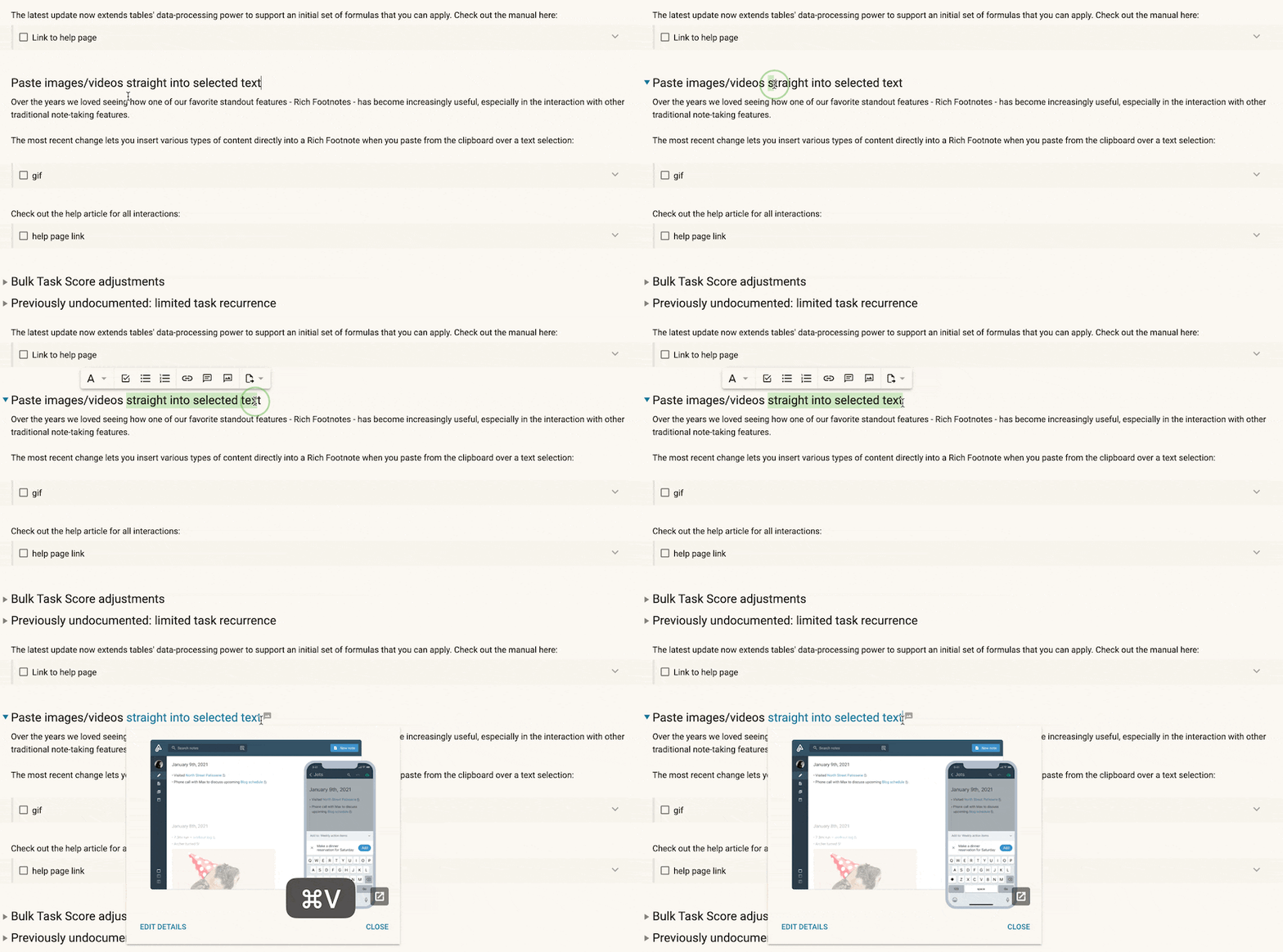
If you want to create a Rich Footnote that includes commentary, or if you want to look up a note to link to, open the Rich Footnote dialog. You can do this by highlighting a word or phrase and use the keyboard shortcut (`Ctrl K` for Windows or `Cmd K` for Mac). Or, you can click the toolbar icons available. On desktop:
\
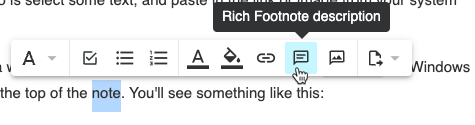 [^27]
> *If you're not into using Ctrl-K or Cmd-K, you can click an icon to insert context into your text*
\
Or on mobile:
\
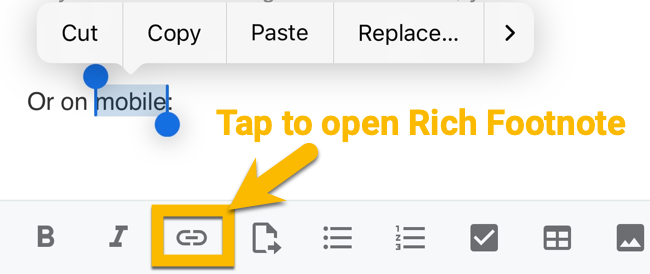 [^28]
> *Tap link icon to open Rich Footnote dialog on mobile*
\
Often, the fastest way to create Rich Footnotes on mobile is to select text and tap "paste." If you have a link, image, or video, it will be embedded within the selected text. ✨
\
### Using the Rich Footnote dialog to search for existing notes to link to
\
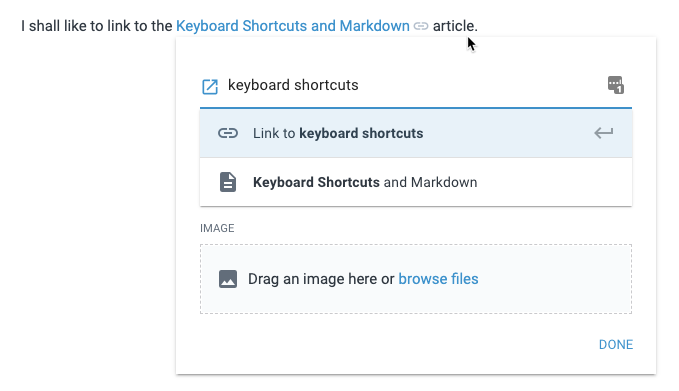
> *Using the input field to link to an existing note or create a new one*
\
When you start entering text in the input field, you'll see a list of your existing notes to select from. If you'd like to create a new note that is linked to, just press enter and we'll link to a new note with the title you entered.
\
This field also accepts any of options from [our double bracket note creation/linking](https://public.amplenote.com/GKCqrq5k57MYpMya7V7tACno). That is, you can use the `#` sign after the note title to link to (and preview in the Rich Footnote dialog) a specific section in a note. Or you can declare a tag hierarchy for the newly created note by using `path/to/New Note` syntax.
\
# Keyboard shortcuts/hotkeys for manipulating Rich Footnotes
Head over to [Keyboard Shortcuts & Markdown Syntax Examples#Rich Footnotes](https://public.amplenote.com/Gw14zfxtHxpvRWAKCUTm22Xi#Rich_Footnotes) for the updated list of hotkeys
\
# Rich Footnote content previews
Content previews work on top of existing [Rich Footnotes](https://www.amplenote.com/help/notes_and_writing_rich_footnotes#What_are_Rich_Footnotes%3F). You can have tweets, Google Sheets and videos show up in your notes simply by pasting their URLs into the Rich Footnotes dialog -- **no additional steps** necessary.
### An example embedding **a public note from Amplenote**
Content previews **work on all published notes**, so embedded content will show up on [`amplenote.com/public/\*` links][^29] too (or in the notes that [you embed in your blog](https://public.amplenote.com/RW7prTintAczaESHaNoHDrCJ)).
\
### An example of **embedding a tweet**
Here's what it now looks like when you [link to a tweet](https://twitter.com/amplenote/status/1326973995191848963). 🐣
\
### An example of **embedding a spreadsheet**
Here is a link to a [spreadsheet ](https://docs.google.com/spreadsheets/d/1Iv357u8XZ6OQfgZwxiByCrHI4oPuZY7d5K4j1qytC0M/edit?usp=sharing). As the owner of the sheet, you can open up the sheet permissions to also make it [editable][^30] directly from the Amplenote client.
### An example of **embedding a video**
Linking to a [YouTube video](https://www.youtube.com/watch?v=Q_050nEIMqw) allows you to play it without leaving the note you're in.
\
Links to [particular timestamps][^31] within a video also work! When hitting play from within a Rich Footnote, the embedded player will start playing from the specified timestamp ✨.
\
# Extracting text selection to Rich Footnotes
Also read about its sister feature: [Extracting text selection to a note](https://public.amplenote.com/GKCqrq5k57MYpMya7V7tACno#Extracting_text_selection_to_a_note).
\
 [^32]
\
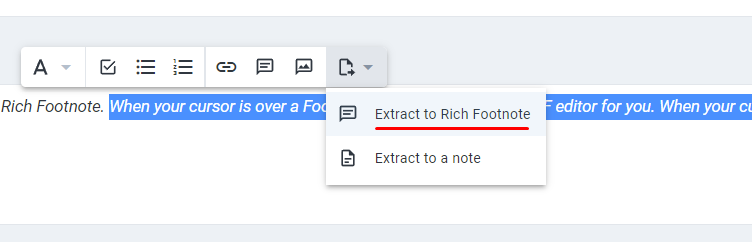
Using the contextual toolbar, you can quickly create a footnote with existing text from your note. Here's what that looks like:
\
> 
>
> *Upon clicking the "Extract to footnote" button, Amplenote will focus on the footnote text field, which allows you to type out the words that will be visible inside the note.*
\
# Converting rich footnote content to a note
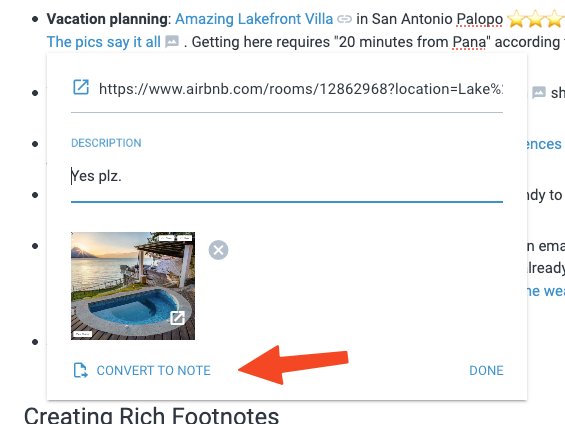
Open a rich footnote and press `Tab` to enter edit mode. Now you have the option to convert that footnote to its own separate note:
\
 [^33]
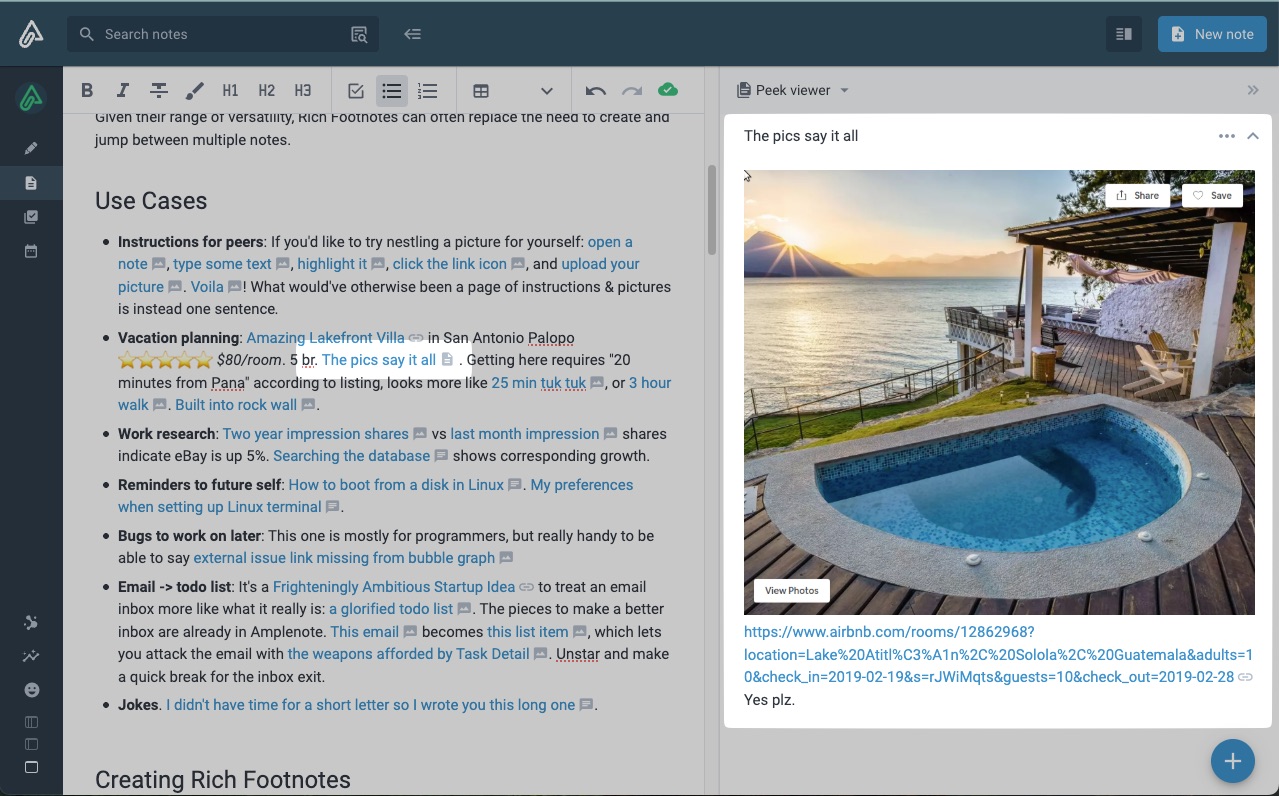
Doing so will result in a new note being created. Also, the previous RF will be replaced with a link to the newly created note:
\
 [^34]
\
# Insert Rich Footnotes from a plugin (Rich Footnote markdown)
As you've probably read, every help document in the Amplenote Help Center is actually just a published note in the support@amplenote.com notebook. This feature is especially handy when you want to see how Rich Footnotes translate to markdown – [you can just look at this page full of Rich Footnotes as a markdown document](https://public.amplenote.com/8AHRJe9whAR2nEPAZza5mGbX.md). There, you can see:
\
```
# What Goes In Rich Footnotes?
As you can see by clicking any of these list items, Rich Footnotes can imbue plain text (and by extension, text in Amplenote tasks and calendar events) with all sorts of extra meaning:
- [🖼️ Image][^2]
- [📽️ Mp4 video]()
- [🔡 Text][^3]
- [🖇️ Links](https://www.amplenote.com/blog)
- [🤩 Youtube video](https://www.youtube.com/watch?v=Q_050nEIMqw)
- [🐦 Tweet](https://twitter.com/amplenote/status/1326973995191848963)
- [📄 Google Sheet](https://docs.google.com/spreadsheets/d/1Iv357u8XZ6OQfgZwxiByCrHI4oPuZY7d5K4j1qytC0M/edit?usp=sharing)
- [👀 Preview of another note](https://public.amplenote.com/vYH5vFT1kjNkDoiDW8biNaa8)
- [🕺 A combination thereof][^4]
- 📫 [Email addresses](mailto:hello@amplenote.com)
... Additional content ...
[^1]: [**context**]()
Which is to say, any given word can diverge from the main topic. This offers extra details to a subset of curious users. Some readers drop with mental energy to dig further into phrases to fully grasp context. Others are in a hurry and skip the detours, as is their prerogative.\
\
All of which is to say: Heya, curious subset of users! 👋 😊 \
\
As an energetic mind, you might be likely to think in multiple directions at once? Such is the audience we hope will try out Rich Footnotes for themselves
[^2]: [🖼️ Image]()

[^3]: [🔡 Text]()
Heya, thanks for checking up on me, good on ya -- this spud's for you: 🥔
[^4]: [🕺 A combination thereof](https://www.amplenote.com/blog/jots_unify_four_apps_ideas_into_idea_funnel)
Amplenote 💖 productivity

```
\
That is, the key to inserting a Rich Footnote into a note is to use the standard markdown link formatting. If your linked document is a type recognized by Amplenote (Youtube, Google Sheets, etc) then you automatically get a content preview. If the link content is text or images, then a `^1` is the link destination, and a subsequent `\[^1\] \[link content\]()` in the inserted content reveals what description and image is shown when the link text is clicked.
# Completed tasks
- [x] Text extraction to RF
- [x] Link to [Keyboard Shortcuts & Markdown Syntax Examples](https://public.amplenote.com/Gw14zfxtHxpvRWAKCUTm22Xi)
- [x] `Ctrl-k` to start an empty RF
- [x] `Tab` to enter RF
[^1]: [**context**]()
Which is to say, any given word can diverge from the main topic. This offers extra details to a subset of curious users. Some readers drop with mental energy to dig further into phrases to fully grasp context. Others are in a hurry and skip the detours, as is their prerogative.\
\
All of which is to say: Heya, curious subset of users! 👋 😊 \
\
As an energetic mind, you might be likely to think in multiple directions at once? Such is the audience we hope will try out Rich Footnotes for themselves
[^2]: [🖼️ Image]()

[^3]: [🔡 Text]()
Heya, thanks for checking up on me, good on ya -- this spud's for you: 🥔
[^4]: [🕺 A combination thereof](https://www.amplenote.com/blog/jots_unify_four_apps_ideas_into_idea_funnel)
Amplenote 💖 productivity

[^5]: [open a note](https://images.amplenote.com/9a4b0fa6-c843-11e8-9f07-f27c0b40db57/bf34c5a4-df56-4b06-b558-88c4af2f66ee)
[^6]: [type some text](https://images.amplenote.com/9a4b0fa6-c843-11e8-9f07-f27c0b40db57/5a5c2a81-9356-4e80-a344-21513ecb0ebd)
[^7]: [highlight it](https://images.amplenote.com/9a4b0fa6-c843-11e8-9f07-f27c0b40db57/fe5966d0-fa87-45d4-b2f8-da648abf928b)
[^8]: [click the link icon](https://images.amplenote.com/9a4b0fa6-c843-11e8-9f07-f27c0b40db57/89faed99-b567-447d-9704-ca8b47e0c1f9)
[^9]: [upload your picture](https://images.amplenote.com/9a4b0fa6-c843-11e8-9f07-f27c0b40db57/7644b758-2d33-43ab-a379-d73e2061ecaf)
If you happen to have a picture in your copy buffer (CMD-shift-control-4 on Mac), you can paste it from anywhere in this popup 💡(I use this technique to upload screenshots without saving them to disk)
Otherwise, click the area shown.
[^10]: [Voila](https://images.amplenote.com/9a4b0fa6-c843-11e8-9f07-f27c0b40db57/89cad7ee-64ff-47e4-92df-b2dbf63d1358)
[^11]: [The pics say it all](https://www.airbnb.com/rooms/12862968?location=Lake%20Atitl%C3%A1n%2C%20Solola%2C%20Guatemala&adults=10&check_in=2019-02-19&s=rJWiMqts&guests=10&check_out=2019-02-28)
Yes plz.

[^12]: [25 min tuk tuk](https://images.amplenote.com/9a4b0fa6-c843-11e8-9f07-f27c0b40db57/332c703b-705c-4fd1-92a6-fcaae4e514bd)
[^13]: [3 hour walk](https://www.google.com/maps/dir/Panajachel,+Guatemala/Unnamed+Road,+San+Antonio+Palop%C3%B3,+Guatemala/@14.7126736,-91.1696226,13z/data=!3m1!4b1!4m14!4m13!1m5!1m1!1s0x85894b8cc176193b:0x9e3f675068327d28!2m2!1d-91.1520965!2d14.7404929!1m5!1m1!1s0x85894995dc667041:0x1913a8cfba2eff2e!2m2!1d-91.117606!2d14.6846713!3e2)

[^14]: [Built into rock wall](https://images.amplenote.com/9a4b0fa6-c843-11e8-9f07-f27c0b40db57/190e6d12-218e-44f9-857b-be18197d58d6)
[^15]: [Two year impression shares](https://images.amplenote.com/4872eeba-7596-11e8-bf60-c6c7cb6d06a5/32cef943-9245-4036-aa4b-fd2c70cb90ea)
[^16]: [last month impression](https://images.amplenote.com/4872eeba-7596-11e8-bf60-c6c7cb6d06a5/17d64c1a-af4e-4213-86a1-028350fa1978)
[^17]: [Searching the database](https://www.amplenote.com/blog/writing_in_3d_how_the_writing_method_impacts_thinking)
Database query to use:
Item.joins(:more_info).where(source_em: "ebay").where(created_at: 2.years.ago..1.year.ago).count
[^18]: [How to boot from a disk in Linux](https://www.amplenote.com/blog/writing_in_3d_how_the_writing_method_impacts_thinking)
Choose option 3 upon restart. After reaching terminal:
fdisk -l
sudo mount /dev/nvme0n1p3 /mnt
journalctl -D
[^19]: [My preferences when setting up Linux terminal](https://www.amplenote.com/blog/writing_in_3d_how_the_writing_method_impacts_thinking)
Enable mnemonics
Theme variant: Light
Initial terminal size 120x40
[^20]: [external issue link missing from bubble graph](https://www.gitclear.com/entities/alloy/commits?commit_list_view_type=commit_groups)
Note that it has an issue identifier, `\[B-17762\]` but no link to the issue itself.

[^21]: [a glorified todo list](https://images.amplenote.com/9a4b0fa6-c843-11e8-9f07-f27c0b40db57/ee9a36f4-e239-4edb-8552-09f9b015b74e)
In Paul Graham's more articulate words
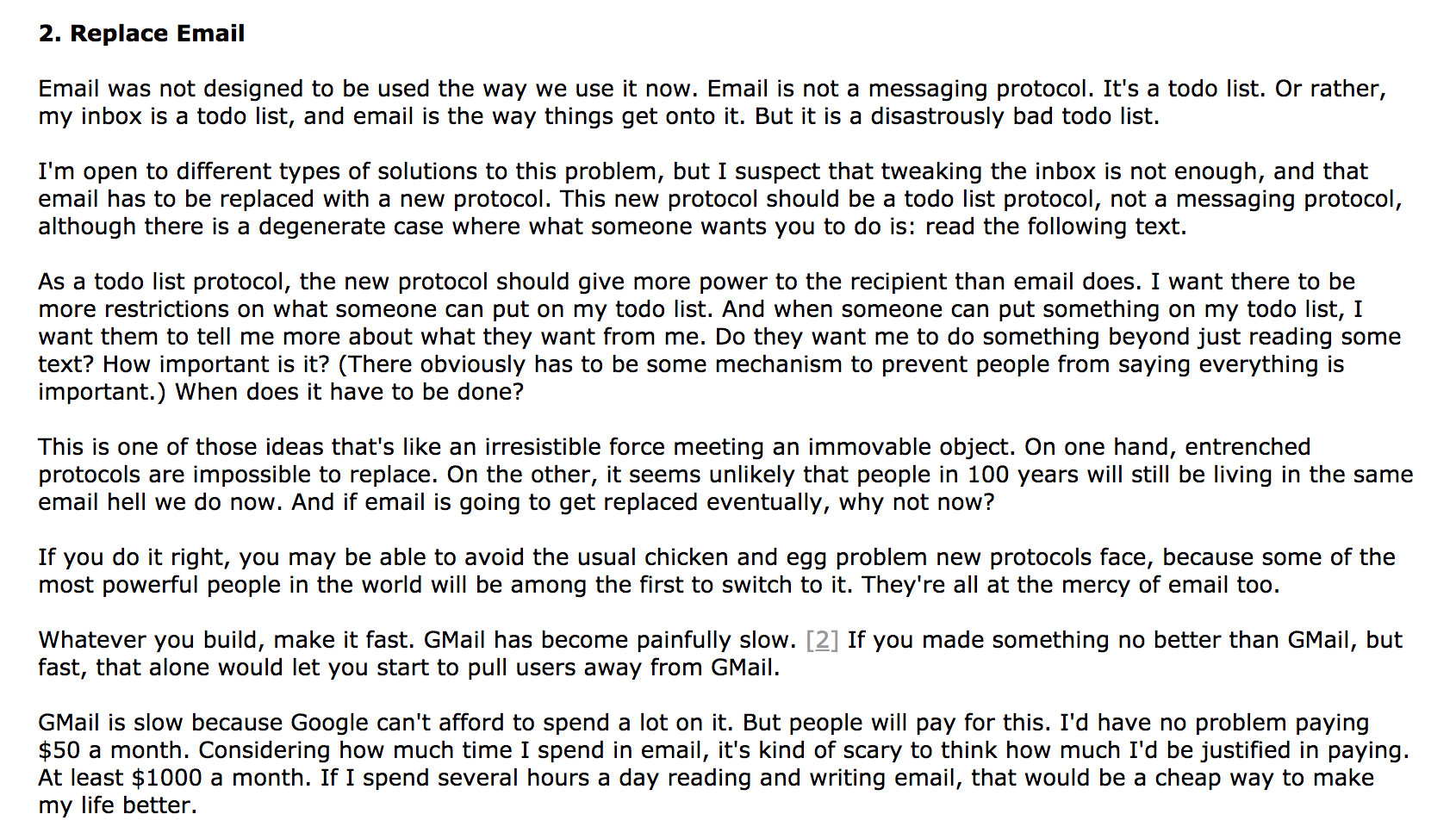
[^22]: [This email](https://images.amplenote.com/9a4b0fa6-c843-11e8-9f07-f27c0b40db57/5756e489-f1e5-4e7f-a0f2-40d6d3f753fc)
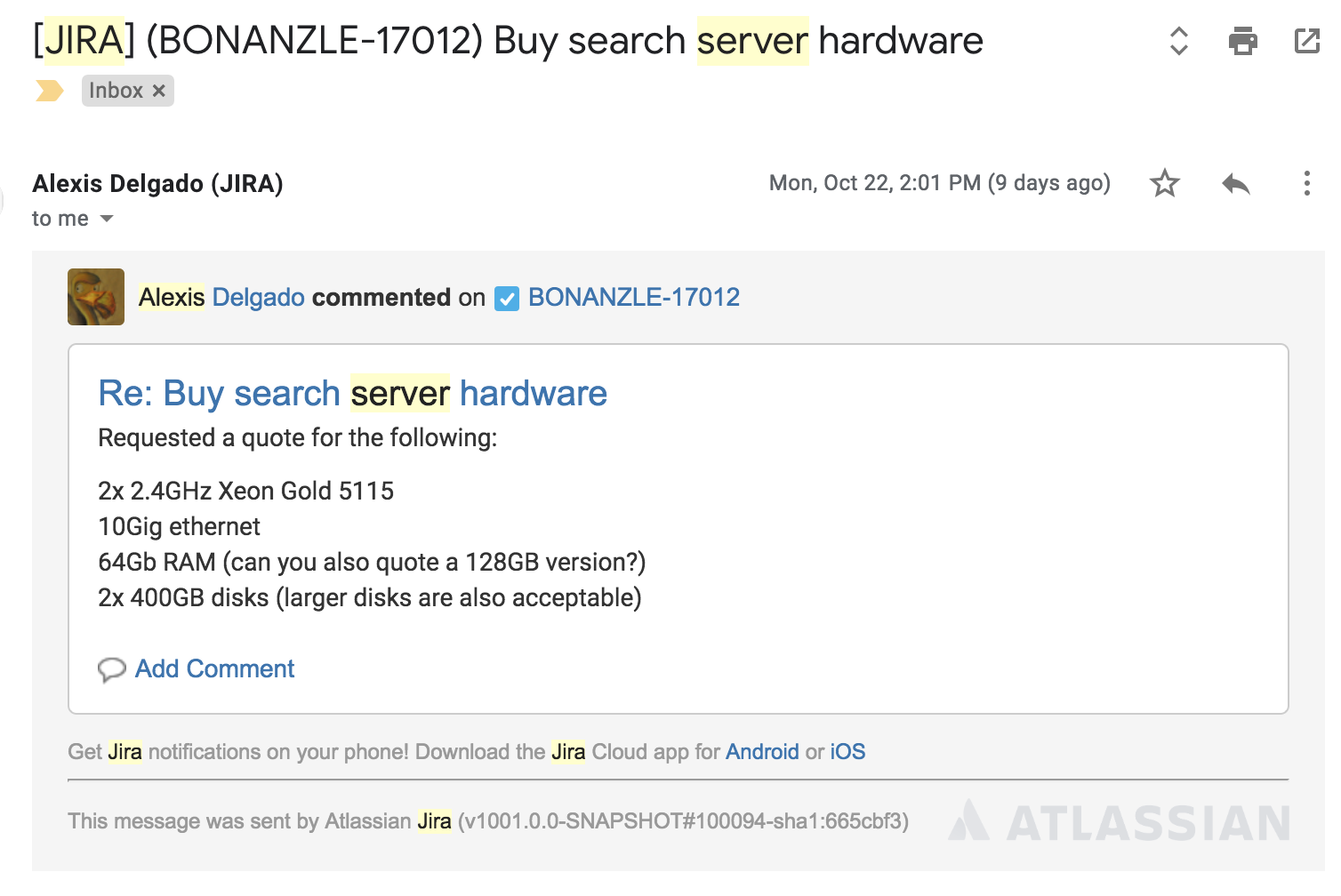
[^23]: [this list item](https://images.amplenote.com/9a4b0fa6-c843-11e8-9f07-f27c0b40db57/b1470252-9d8b-45f3-bbab-922c94d7f2fd)
[^24]: [the weapons afforded by Task Detail](https://www.amplenote.com/blog/repeal_the_todo_list_tax)

[^25]: [I didn't have time for a short letter so I wrote you this long one](https://www.amplenote.com/blog/writing_in_3d_how_the_writing_method_impacts_thinking)
When you are too lazy to figure out the specific thing you want to say, just nestle all your ideas in the Rich Footnote and let someone else figure out what they mean. Or in this case, why they reside under the "Jokes" label.
[^26]: [which includes links to Youtube videos, tweets, etc]()
If you select text in Amplenote and paste a link to a Youtube video, users will see the video player pop up when they click the text.
\
If the link to the Youtube video included a time parameter, that will be used to start the Youtube video at a particular timestamp. See the "Writing in 3d" link at the beginning of this page for an example of linking to a video in the middle.
[^27]: Rich Footnote description
A -
A .G
Windows
the top of the note. You'll see something like this:
[^28]: Cut
Copy
Paste
Replace...
>
Or on mobilet
Tap to open Rich Footnote
B
I
E
V
[^29]: [`amplenote.com/public/\*` links](https://www.amplenote.com/blog/richer_footnotes_tweets_google_sheets_videos_note_sections)
As well as on this Amplenote blog post, which is merely a note in a notebook
[^30]: [editable](https://www.amplenote.com/blog/richer_footnotes_tweets_google_sheets_videos_note_sections)
Feel free to contribute to my ambitious project by rating the entire discography of Florence + the Machine or by adding new artists of your own🙂.
[^31]: [particular timestamps]()
That is, links that have a `?t=xxx` at the end of the URL, where `xxx` is the moment in the video described in seconds.
[^32]: A v
GEE
Rich Footnote. When your cursor is over a Foo
Extract to Rich Footnote
editor for you. When your c
Extract to a note
[^33]: . Vacation planning: Amazing Lakefront Villa > in San Antonio Palopo A A
The pics say it all A . Getting here requires "20 minutes from Pana" according
\[ https://www.airbnb.com/rooms/12862968?location=Lake%.
DESCRIPTION
ances
Yes plz.
idy to
n ema
Iread
he we
CONVERT TO NOTE
DONE
Creating Rich Footnotes
[^34]: Q Search notes
+ New note
BIT . H1 H2 H3
GEE
Peek viewer
> >
Given their range Of versatility, Rich Footnotes can often replace the need to create and
jump between multiple notes.
The pics say it all
. . .
Use Cases
\[\] Share
Save
. Instructions for peers: If you'd like to try nestling a picture for yourself: open a
note , type some text , highlight it , click the link icon , and upload your
picture . Voila ! What would've otherwise been a page of instructions & pictures
is instead one sentence.
. Vacation planning: Amazing Lakefront Villa Go in San Antonio Palopo
wwwww $80/room. 5 br. The pics say it all . Getting here requires "20
minutes from Pana" according to listing, looks more like 25 min tuk tuk , or 3 hour
walk . Built into rock wall .
. Work research: Two year impression shares / vs last month impression _ shares
indicate eBay is up 5%. Searching the database shows corresponding growth.
. Reminders to future self: How to boot from a disk in Linux . My preferences
when setting up Linux terminal .
. Bugs to work on later: This one is mostly for programmers, but really handy to be
able to say external issue link missing from bubble graph
. Email -> todo list: It's a Frighteningly Ambitious Startup Idea to treat an email
View Photos
inbox more like what it really is: a glorified todo list . The pieces to make a better
inbox are already in Amplenote. This email / becomes this list item , which lets
https://www.airbnb.com/rooms/12862968?
you attack the email with the weapons afforded by Task Detail . Unstar and make
location=Lake%20Atitl%C3%AIn%20%20Solola%20%20Guatemala&adults=1
a quick break for the inbox exit.
0&check_in=2019-02-19&s=rJWiMqts&guests=10&check_out=2019-02-28 >
. Jokes. I didn't have time for a short letter so I wrote you this long one F.
Yes plz.
O
Creating Rich Footnotes