If the last two quarters were about making AI-authored code visible -- cohorts, context, line-level attribution -- this quarter was about making it actionable. The single biggest thing we shipped is an agent you can ask, in plain English, almost any question about your engineering data, and have it come back with the chart that answers it. Alongside that, we opened a path for the majority of Claude Code teams who aren't on an Enterprise plan to finally get line-level visibility into what their models are writing, and we rounded out our roster of directly measured AI providers to six.
As always, our north star hasn't moved: every number GitClear reports should be one you can drill into, audit, and defend -- whether the line was written by a senior staff engineer or by Claude Opus. Here's what's new.
link🧑🏫 Headliner #1: The Data Deep Dive agent
This is the most important thing we launched this quarter, full stop.
For years, the friction in engineering analytics has been the same: the answer you need is somewhere in the data, but finding the right report — with the right team, the right date range, and the right segmentation — takes either tribal knowledge or a SQL editor. Competitors have tried to solve this with query builders 😵💫. We think the better answer is to let you ask the question the way you'd ask a colleague.
The Data Deep Dive agent answers virtually any question you pose to it, automatically taking into account the team, resource, and date context you've selected. "Show AI-authored vs. human-authored Diff Delta by team over the last 90 days, and highlight teams where AI lines are revised most often." "Compare Claude Code, Cursor, Copilot, and Codex by durable Delta per dollar." "Find teams where high AI usage correlates with lower PR cycle time but higher churn." The agent constructs the chart across code, AI-usage, survey, PR, defect, and team dimensions — no SQL, no report-construction wizardry.
What makes this more than a novelty is what comes after the answer. The Data Deep Dive agent is the fastest way we've ever built to discover relevant reports. When the agent surfaces a chart that matters to you, you can Star it, which adds it to your page of "most relevant" charts. Those starred charts then become inputs to Outlier Reports, so you can see which teams are performing best — or worst — on precisely the metrics you've decided matter. The loop is: ask → discover → Star → monitor outliers. It turns a one-off question into an ongoing, monitored KPI.
The Data Deep Dive agent answers a plain-English question about AI ROI against a live repo — then the result can be Starred and monitored with Outlier Reports.
link📊 Headliner #2: The Claude Code telemetry agent
The second headliner (installable package here) solves a problem we kept hearing from teams who'd adopted Claude Code: they could see that their developers were using it, but not what it was producing, line by line, in a way they could later audit.
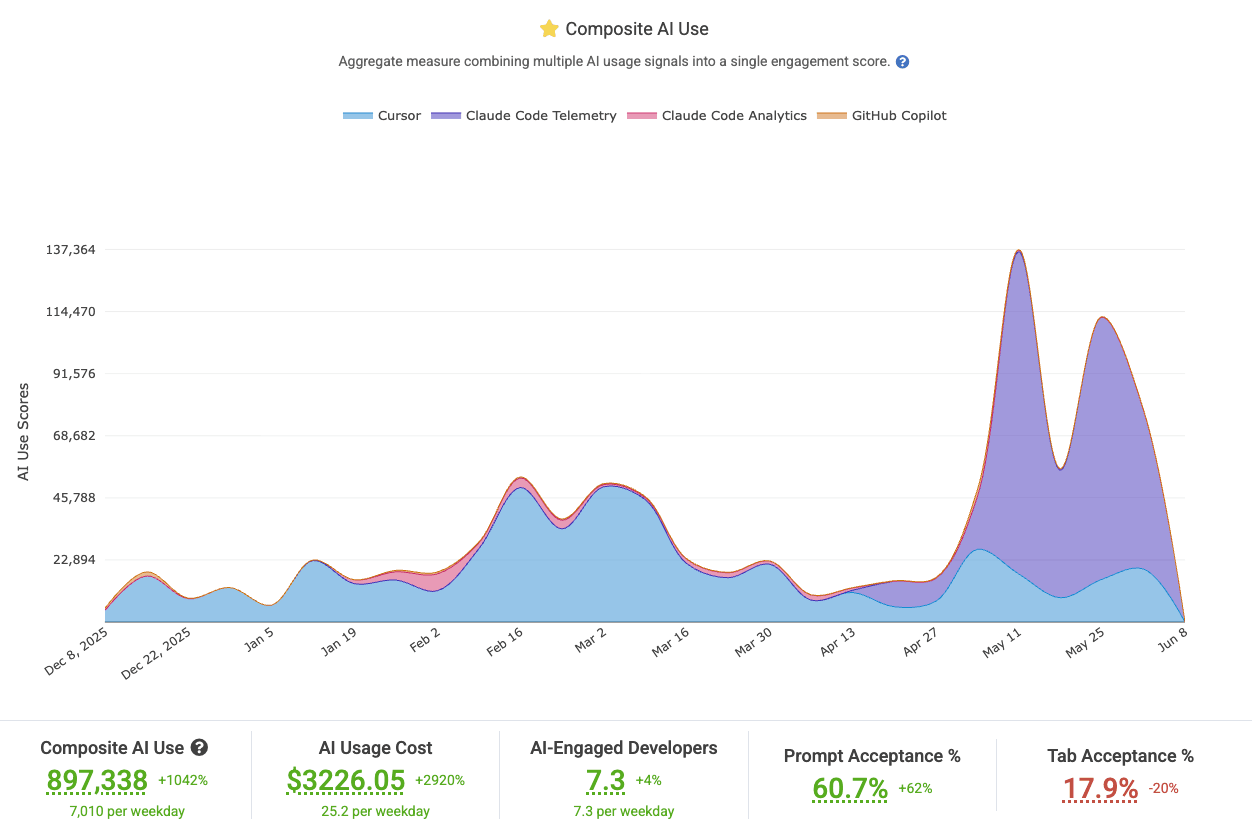
A typical team's breakdown of AI usage by provider
Anthropic's own analytics split along plan lines:
Claude Platform/Console: Pay per use. Works for Enterprise. Pretty solid usage stats available & supported by GitClear since late 2025.
Claude Teams Enterprise: A subset of the Claude Platform stats, only available to those on pricey Claude Enterprise plans. In customers who have tried it so far, Claude has been spotty in actually returning "lines added" and "lines deleted" (seems to require Github App integration) or tool accept actions. Pretty limited use as of Q2 2026
These options aren't great. Most small-to-mid-size businesses we talk to are using Claude Teams, but not an Enterprise account. But even among those that do pay up for Enterprise are still getting some vBeta-type API stats back from Anthropic so far.
GitClear's Claude Code telemetry agent closes that gap. It's the only option we know of, aside from Anthropic's own surfaces or ad hoc scripts, to get high fidelity Claude Code usage metrics for any Claude plan. Two things make it stand out:
Line-specific authorship granularity. Know which specific lines are changed by which model--not as an aggregate estimate. The precision line mapping possible with Claude Telemetry supports long-term defect investigations. When a bug surfaces months later, you can ask whether the offending lines came from a human, from Opus, or from Haiku, and weight your review process accordingly.
Prompting-tactic outcome analysis. Because the agent captures the relationship between sessions and downstream results, you can begin to study which prompting tactics to create education materials that improve the organization's prompting outcomes over time.
This pairs naturally with the Diff Delta methodology that underpins everything else in GitClear: once a line is attributed to a model, it's scored for durability on the same basis as every other line in the repo. Claude's output -- or a staff engineer's output -- both get measured with the same ruler, across the same time window.
link💪 Headliner #3: AI ROI stats
Initially we built out the means to understand AI use by evaluating weekly cohorts of use compared to various stats, but since this can strain interpretation, we now offer a simpler version of the AI Cohort Data, the AI ROI tab:
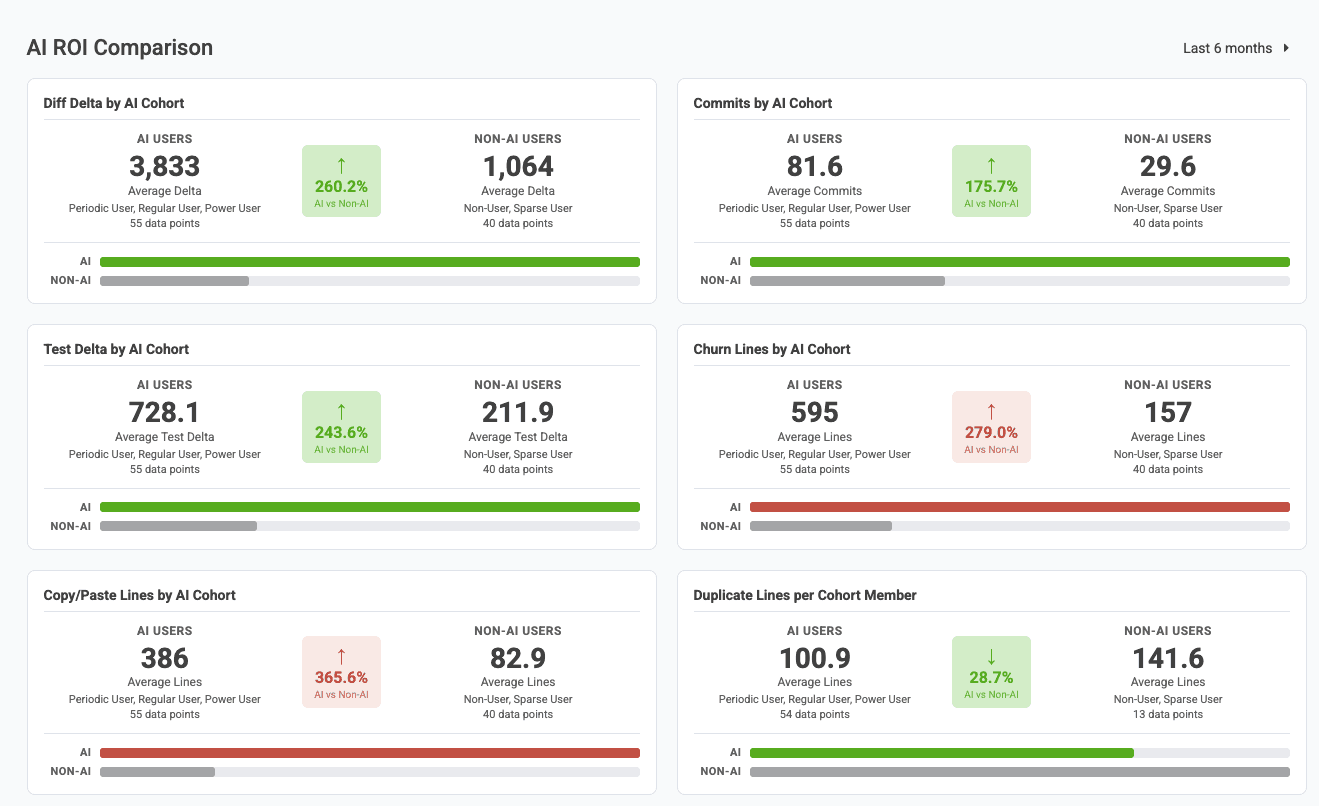
Other ROI dimensions compared, lower on page: Defect rate, Epics resolved, Story Points, Issues Resolved, PRs Opened, Teammates' Review Time Induced
By comparing across AI providers, the AI ROI stats shine a direct light into how a team's AI-engaged developers differ from those who have been slower to pick up the available tools.
link📦 Other Big Upgrades
A handful of smaller-but-meaningful upgrades shipped this quarter, several of them sourced straight from the changelog:
linkSix directly measured AI providers
The roster of AI providers GitClear measures directly — via vendor usage APIs and agent telemetry hooks, not survey self-estimates (though we have those as well) — now stands at six:
 |  |  |
 |  |  |
Codex is the newest addition, available via a telemetry agent that's currently in beta. If you'd like to trial it, email hello@gitclear.com and we'll get you set up.
linkExplicit AI Provider :: Developer Mapping
You can now see which developers are mapped to which AI provider identities within Settings => AI Provider Committer Mapping:
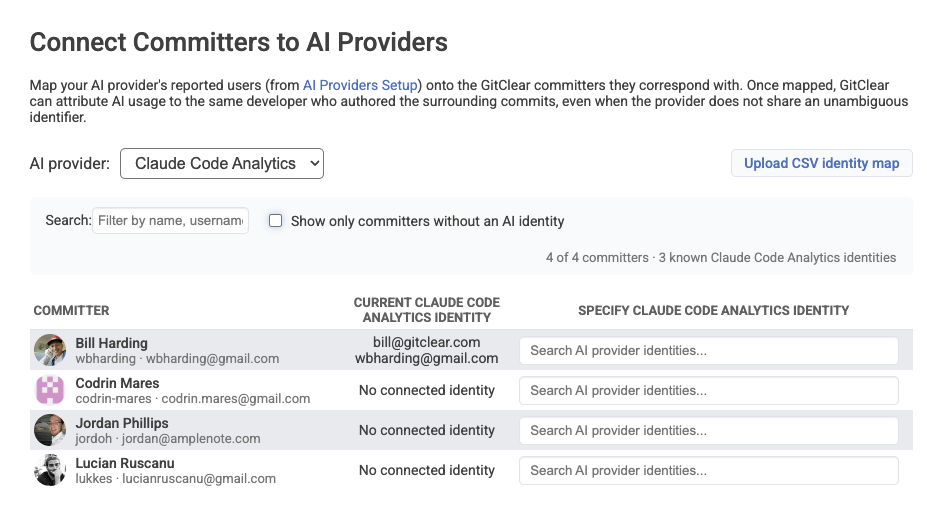
Mapping committers to Claude Code identities
In most all cases, developer mapping happens automatically by using email addresses, committer name, and other identity heuristics. For the edge cases, this new form offers a fast & convenient means to ensure that developers are credited for their work with each of the AI Providers.
You can also upload a CSV file to associate developer identities in bulk.
linkMicrosoft Teams Notifications
The long-awaited companion to GitClear's Slack notifications, users of Microsoft Teams can now connect GitClear team notifications to their channel of choice.
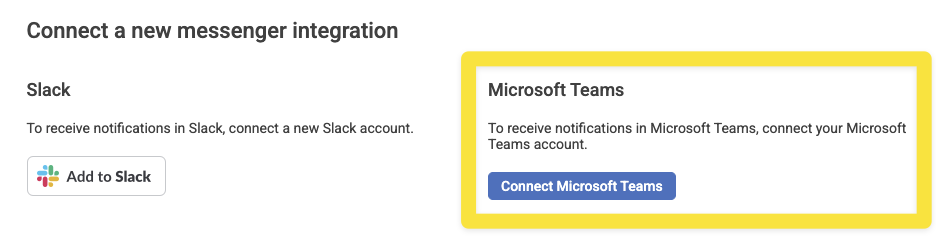
Initiate an Oauth connection to Microsoft Teams from Settings
Microsoft Teams can be connected by visiting Settings => Messenger Integrations. The usual rules apply for choosing which notifications will be sent to which channels.
linkImproved Diff Delta explanation
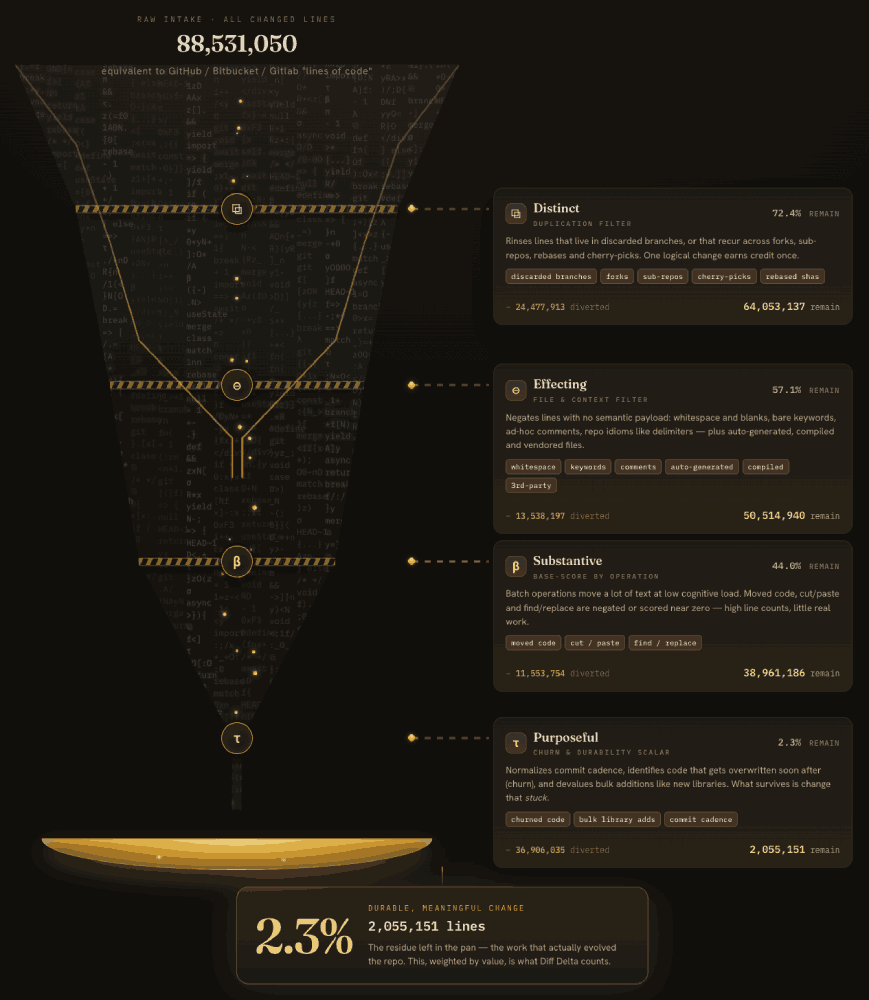
If anyone has wanted a better way to explain Diff Delta to coworkers, or explain the potential to measure the magnitude of AI contribution.
linkLLM-Driven Help Center
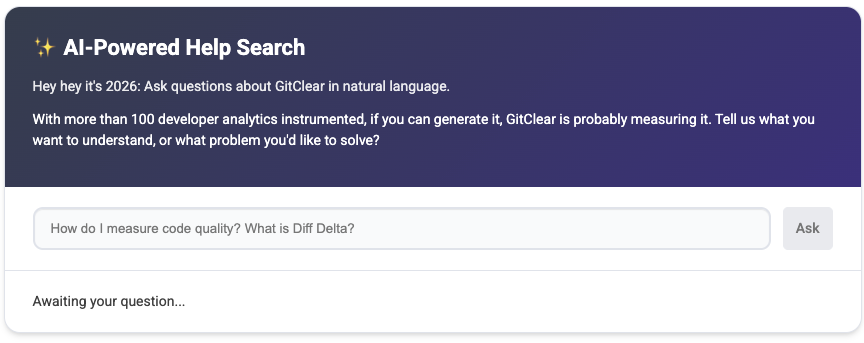
We have expanded our Help Center agent such that it now has indexed all of the GitClear API docs (if you're trying to remember the definition of a particular segment), plus all of GitClear's industry-leading research on AI Code Quality.
linkProactive AI Token Vetting
Now, when you submit a new AI API token to measure your usage of Cursor, Copilot, Claude, etc., we will launch a prioritized reference query to confirm that the token you have provided is capable of accessing the expected API. If the token is unable to retrieve data, you'll get a notification on the spot, instead of waiting days to discover that AI data hasn't been populating.
linkMore upgrades
Bundle notifications sent to Slack/Teams. Now, when you set up Team Goals that send notifications to Slack or Microsoft Teams, we'll only send one message per type of notification per run.
Surveys API. We added a V1 Surveys API that lets you create and retrieve polls and manage questions programmatically, plus full API documentation covering endpoints, parameters, and usage examples. This makes developer-sentiment data a first-class, automatable citizen alongside the code and workflow signals GitClear already tracks, useful for teams that want to pair "what developers say" with "what the commit graph shows."
Updated home page. Now focused on what GitClear offers as an AI ROI tool.
More granular segmentation by team and repo. We added new segments that let you slice more stats by team and by repo, giving finer-grained control over exactly which slice of the org a chart represents.
Pull-request accuracy fixes. We shipped fixes to prevent a PR from missing its merge_commit, corrected post-merge logic so updates to squashed PR commits are detected, and fixed a PR-comment time fallback that could inflate review-time estimates. We also made assorted Enterprise job-running improvements (with thanks to Davit and the team at Bank of Georgia for the field reports), and tuned AI Cohort chart sorting so cohorts always render in a consistent "least use to most use" order.
More frequent AI usage re-grabs. Many AI providers do not finalize their usage data the day that it occurs. In fact, even a day or two after the data is collected, providers like Anthropic still can't guarantee that all usage will have been propagated through its databases into the API. To accommodate this "eventual consistency," GitClear now makes numerous passes to confirm the integrity of AI Usage data remains consistent with what is reported by the AI provider.
link👶 Added context for newly migrating users
With the speed that GitClear has been launching AI ROI metrics, we're seeing more interest than ever from curious customers of Jellyfish, Pluralsight, DX and LinearB. To help users understand the core differences between GitClear and the most popular AI insight tools, GitClear offers a refreshed set of links in the site footer:
Jellyfish Alternative. For teams who want line-level AI authorship attribution and a published, auditable Diff Delta methodology, rather than adoption telemetry plus a single opaque score.
Pluralsight Flow Alternative. GitClear as the spiritual successor to GitPrime's lines-of-code analysis, rebuilt with churn-aware Diff Delta and line-level AI attribution that Flow's Impact score never grew into.
DX Alternative. For leaders who want DX's survey-and-custom-metric flexibility plus code-level AI ROI and English-language chart creation instead of a SQL editor.
LinearB Alternative. For teams who signed up for analytics and now find themselves paying for credit-metered workflow automation they don't use, and who want flat per-contributor pricing.
We've tried to keep these pages fair: each acknowledges where the other product is genuinely strong, then makes the sharp, specific case for where GitClear wins: defensible AI ROI, auditable metrics, transparent pricing, and a research foundation built on continuous public data dumps.
link📘 New AI Leadership book from Lee Atchison
Not exactly a GitClear update, but: for the VPs and CTOs in our audience, O'Reilly Leadership expert Lee Atchison recently released his new book The Software Conductor, on the journey from software developer to architect, a journey that most all developers are now on whether we like it or not. As Lee explains:
 |
|
Here's the brief story that led to the book's origin. And here is the link to buy it on Amazon.
link🔮 What's next
We're about to launch a set of AI Code Quality dashboards that will let the public glimpse how AI is impacting development beyond the token leaderboards.
GitClear's AI Code Quality Signals will provide about 10 long-term graphs that offer insight into the different ways that AI is modifying development for better and worse. Stay tuned to our next blog post to be the first to hear when our new AI Code Quality graphs are available (estimate: mid-June 2026).
After that, we're delving into deeper connections between "AI output" and the type of the prompts that precede said output. We're also going to shine the spotlight on AI super-spenders, focusing new graphs into the dynamics that play out at the top end of the "token-consumption leaderboards" that have provided so much absurdist entertainment during the past month.
GitClear is a software engineering intelligence platform built around the Diff Delta metric, commit-level AI attribution, and one of the largest public code-quality research datasets in the category. Every stat is designed to be drilled into, audited, and defended. Questions, or want to trial the Codex beta? Email hello@gitclear.com.