GitClear offers the means for teams using Claude Code to get per-line granularity on which changes were LLM-authored, vs. human-authored. Our LLM calls this a "killer feature" because of the gap that currently exists between the "Claude Code Usage API" (which offers fairly limited stats as of Q2 2026) and what developers, CTOs, and VPs of Engineering have requested from GitClear.
The rest of this help page describes how to enable granular outcome tracking for teams using any version of Claude Code.
linkChoosing Self-install vs Deployed install
The first question to make when considering using the Claude Telemetry script is "how to place the telemetry script file on developers machines?" GitClear offers two install paths, each suited for its own audience.
The "Option #1: Self Install" is an npm package that is ideal for small teams, or for individual developers who want to get stats on their own AI usage. The benefit of "Option #1" is that you get Claude Telemetry stats with a single console command.
The "Option #2: Deployed Install" is the typical Enterprise path. It is ideal for environments when a system administrator can push files to a fleet of developer machines. The benefit of Option #2 is that developers don't have to do anything to start sending telemetry stats.
linkOption #1: Self-Install for Developers, Open Source and Small Business
If you want to install the Claude Telemetry script on your own machine, start by visiting this URL to retrieve the npm install command line: https://www.gitclear.com/claude_telemetry_js. If you're running from an Enterprise installation, replace "www.gitclear.com" with your own GitClear host.
Upon visiting this page, GitClear will retrieve your entity's API key, which is provided to the npm install process when first run.
The npm package you install will change (much) less frequently than the telemetry script itself. To ensure that you have the latest Claude telemetry script installed, after you've installed the npm package, you can run gitclear-claude-telemetry --update. The latest script will be retrieved and installed in place without any further action needed from you.
linkOption #2: Deployed Install for Enterprise and System Administrators
In this install path, developers do not need to do anything. The administrator downloads and distributes the Claude telemetry script, updates Claude's settings.json file (per instructions below), and that's that. Developers may see a one-time prompt on the first time they open Claude, but after that the script will just run silently via hooks.
As with all GitClear features, the hook is bound by GitClear's Developer-Friendly Analytics, so the data collected by this script can not be used to unfairly target individual developers.
linkStep One: Retrieve the Enterprise script
After signing up for a GitClear account, you can visit https://www.gitclear.com/claude_telemetry_js/download to download the script (an mjs file) that will be distributed. The downloaded file is pre-seeded with your GitClear API key, so that individual developers don't need to retrieve this key themselves (as with Option #1)
linkStep Two: Distribute Script to Team
Claude Code supports four managed-settings delivery mechanisms. Pick the one that matches your infrastructure. All four produce the same result: hooks that developers cannot override.
Method | Best for | Developer action required | Tamper resistance |
A. Server-Managed (Admin Console) | Orgs without MDM, fastest setup | None | Client-side only |
B. macOS MDM (Jamf / Kandji / Intune) | Mac-heavy shops with MDM | None | OS-level enforcement |
C. Windows GPO / Intune | Windows shops | None | Registry-level enforcement |
D. File-Based (Ansible / Chef / Puppet) | Linux fleets, mixed OS without MDM | None | File-permission enforcement |
Before configuring Claude's managed settings, we must ensure the telemetry hook script exists on every developer's machine at a consistent path. Since Claude's managed settings (a JSON file) can reference only absolute paths, all distributed scripts must be placed at a directory that is consistent among users of a given OS.
Recommended install path:
OS | Path |
macOS |
|
Linux |
|
Windows |
|
linkOption A: Distribute via your config management tool
Ansible example:
Chef example:
linkOption B: Distribute via MDM (macOS)
Package the script into a .pkg installer and deploy via your MDM's software distribution. Tools like munkipkg or Jamf Composer can create the package.
Upload the .pkg to your MDM and assign to your developer scope/group.
linkOption C: Distribute via GPO / Intune (Windows)
Package as an .intunewin file or MSI, or use a PowerShell script deployment:
linkStep 3: Configure Managed Claude Settings
After the Claude telemetry file has been distributed to all developer machines, the final step is to update the organization's Managed Claude settings.json to reference the file that was deployed.
linkMethod A (Preferable): Server-Managed Settings (Admin Console)
This is the simplest method. No MDM required. Settings are delivered from Anthropic's servers and cached locally on each developer machine.
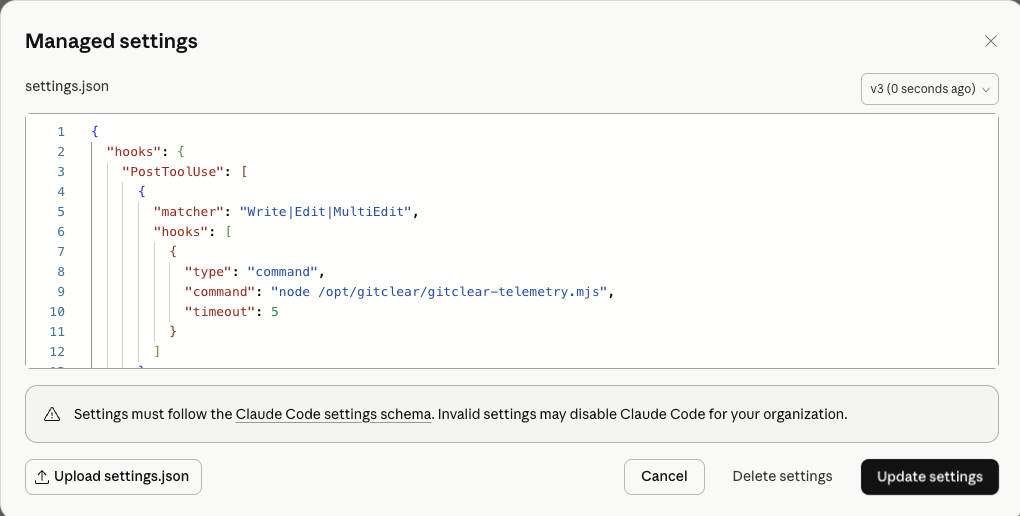
Claude's provided editor for modifying the globally used settings.json file
Sign in to claude.ai as an organization Admin.
Navigate to Admin Settings → Claude Code → Managed settings.
Paste the following JSON:
Click Save.
Settings take effect on the next Claude Code session start. Existing sessions pick up changes within one hour (Claude Code polls for updates hourly).
Windows adjustment: Replace the
commandpaths with:"node \"C:\\Program Files\\GitClear\\claude-telemetry.mjs\""
Limitation (current beta): Server-managed settings apply uniformly to all users in the organization. Per-group targeting is not yet supported. If you need different settings for different teams, use MDM or file-based deployment.
linkMethod B (More Complicated): macOS MDM (Jamf / Kandji / Intune)
Deploy a configuration profile targeting the com.anthropic.claudecode managed preferences domain. This provides OS-level enforcement that persists even if the developer has local admin rights.
Create a .mobileconfig file:
Deploy via Jamf Pro:
Go to Computers → Configuration Profiles → + New.
Under Application & Custom Settings, upload the .mobileconfig.
Scope to your developer Smart Group.
Save and distribute.
Deploy via Kandji:
Go to Library → Add New → Custom Profile.
Upload the .mobileconfig file.
Assign to your developer Blueprint.
Generate a unique PayloadUUID: Run
uuidgenin Terminal and replace the placeholder UUIDs above. Each profile and each payload within it must have a unique UUID.
linkMethod C: Windows Group Policy / Intune
Deploy settings via the Windows registry at HKLM\SOFTWARE\Policies\ClaudeCode.
Group Policy (GPO) deployment:
Create a .reg file:
Deploy via a GPO Computer Startup Script that imports the .reg.
Intune deployment (PowerShell remediation):
linkMethod D: File-Based (Ansible / Chef / Puppet / Manual)
Deploy a managed-settings.json file to the system-level directory. Requires root/admin access to write, but is readable by the developer's user account.
File locations:
OS | Path |
macOS |
|
Linux |
|
Windows |
|
Ansible example (Linux + macOS):
Drop-in directory: You can also use
managed-settings.d/alongside the base file. Files in that directory are sorted alphabetically and deep-merged onto the base. This lets you ship the GitClear hook as an independent fragment (e.g.,20-claude-telemetry.json) without touching existing managed settings:/etc/claude-code/managed-settings.json # existing org security policymanaged-settings.d/10-security.json # existing deny rules20-claude-telemetry.json # ← your hook config (merged on top)Arrays (like
hooks.PostToolUse) are concatenated and deduplicated, so the GitClear hooks are added alongside any existing hooks without replacing them.
linkStep 4: Verify Deployment
linkOn a developer machine (non-invasive spot check)
Ask a developer to run the following inside Claude Code. They do not need to understand what this does — it is a diagnostic command:
In the output, look for the managed settings source line. It should show one of:
Enterprise managed settings (remote) — Method A is active
Enterprise managed settings (plist) — Method B is active
Enterprise managed settings (HKLM) — Method C is active
Enterprise managed settings (file) — Method D is active
Then run:
This lists all active hooks. You should see PostToolUse with matcher Write|Edit|MultiEdit sourced from "managed".
linkAutomated verification (fleet-wide)
macOS (via MDM Extension Attribute in Jamf):
Linux / any OS (via Ansible ad-hoc):
linkUpdating the Hook
To push an updated version of claude-telemetry.mjs:
Retrieve & distribute the new script file using the same mechanism as Step 1.
No changes to managed settings are needed (the settings reference the file path, not the file contents).
The updated script takes effect on the next hook invocation — no Claude Code restart required.
To update the managed settings (e.g., change flush interval or add new hook events):
Method A: Edit in the Admin Console. Changes propagate within one hour.
Methods B/C/D: Push the updated file/profile/registry via your existing deployment pipeline.
linkTroubleshooting
Symptom | Likely cause | Fix |
| Settings file in wrong path, or MDM profile not scoped to machine | Verify file exists at the OS-specific path; check MDM scope |
| Managed settings JSON is malformed | Validate JSON syntax; check |
| Hook script not found at referenced path | Verify |
Events are cached but never uploaded |
| Check the |
Developer reports Claude Code is slow | Hook timeout too high, or script hanging on network call | The PostToolUse hook has a 5-second timeout; if it consistently hits this, check Node.js availability |
Developer bypasses hooks with | Known bug (GitHub #26637, Feb 2026) | Set |
linkWhy Use Claude Telemetry Script?
This page is largely dedicated to the "how" of GitClear's Claude Telemetry setup, but for those who haven't already contextualized why they might want to install this, some reasons that customers pick this instrumentation:
It might be your only option. 🙃 If you are on a non-Enterprise Claude Teams plan, as of Q2 2026, Anthropic has not yet released an Analytics API available to you. The only option to understand "which developers are using which LLMs, and what's the ROI of their work?" is to install the telemetry script.
Most precise per-line model attribution. Integrations that connect to the AI provider API need to rely on extrapolation and heuristics to approximate "which committed lines were authored by the LLM?" The telemetry script eliminates this approximation by capturing a one-way hashed fingerprint of each line authored by the LLM. When a developer eventually pushes their work, it is possible to derive which lines were committed verbatim, and which lines were modified by a human after the LLM's initial authorship. This means that all of the long-term "ROI of AI authorship" metrics are more accurate with telemetry than with the AI provider APIs.
Captures metadata to spot prompting patterns. As of mid-2026, no AI API returns granular information about the type of prompts that are being written to produce the code that is eventually committed. In contrast, the telemetry script records assorted metadata that is used to help customers understand the relation between different prompting tactics and the quality of code that gets committed and ultimately deployed. Note that the telemetry script does not record prompt text.
Works inside Enterprise firewall. Unlike the provider APIs, the telemetry script can operate completely within a company's local network. The only requirement for the script to collect data is that individual developers can reach the URL where the company's local GitClear instance is running.
Unlimited adaptability. Customers can't directly impact what type of data is reported by the AI APIs, but they can directly impact what type of data is collected by the telemetry script. If you have specific ideas that you believe would help to better understand how your team is leveraging AI, drop us a line (email hello at our domain). If you're a paying subscriber, we will listen to your ideas and consider whether we can incorporate a means to capture the specific data you'd like to better understand.
Note that the Claude telemetry script is being updated about once per week during 2026, so be sure to check back periodically to make sure you're capturing all the latest informative data on the extent to which your development pipeline is being sped up.