GitClear offers numerous paths to track when the code in a repo has been released to production. In accordance with the Accelerate metrics, top tier teams target making a release to production every business day. Different types of products will naturally release at different frequencies, so as long as you make a release more than once per month, you can avoid the lowest tier performers:

The distribution of performance among Google's study participants
Once you have set up a release tracking rule, you can see the frequency of your releases graphed in the "Velocity" tab under "Devops Stats"
linkAdding a new release tracking rule
To set up release tracking on GitClear, you have five options to detect when a release has occurred, first visit Settings -> Release Tracking

Then create a new rule to be used, or review releases you have generated through the API:
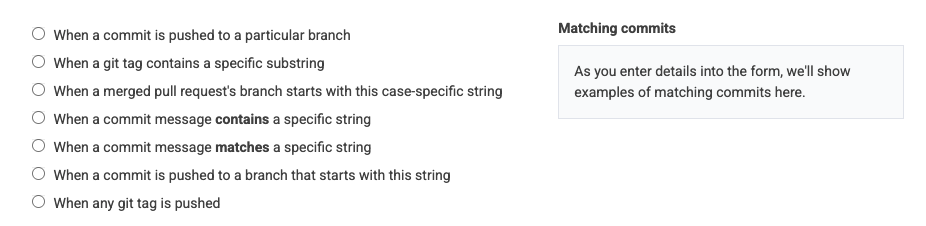
If you aren't designating releases through the API, this form can let you configure what event constitutes a code release
Some additional details about the deploy markers:
link1. When a commit is pushed to a particular branch
If you use a release branch, this will be added by default. If you push to a different branch, you can specify its name here. The head commit that is pushed to the branch will be designated as a release, and the commits that preceded the lead commit will be demarcated as having been released.
link2. Git tag contains a specific substring
If you apply a tag on releases, then you can provide a unique substring of your tag naming pattern to designate a release. For example, if you always release with a tag alpha-v0.01, then the substring alpha could be used to detect when a release is made.
link3. When a merged PR branch starts with a string
To designate a release when a pull request is merged to a particular branch. The merge commit will be designated the "release," and the commits in the pull request will be marked as "released" in the deploy defined by the merge commit.
link4. Commit message contains a specific string
For example, if your commits always contain the term “Cached asset deploy,” then this term could be entered and any commit message containing this case-insensitive series of words will be marked as a “release”
link5. Commit message matches a specific string
If you have a specific string that occurs in commits that correspond to a release, that can be used as a hook to indicate when a release has been made.
link6. Commit pushed to a branch with prefix
This rule is most likely relevant if you're looking to create a single rule that covers different repos that are to have a deploy recorded when commits are pushed to a branch prefix. For example, maybe you have Repo A that designates a release when the "release-stable" branch is pushed, and Repo B is deployed when a commit is pushed to the "release-production" branch. You could specify release as the branch prefix and define a rule that works for both Repo A and Repo B.
link7. When any git tag is pushed
By default, repos record a release when a git tag is pushed. You can remove this rule if you push git tags in cases that do not constitute a release of the repo.
linkDeploying via API call
If you would like to designate a release via a RESTful API call, check out the release tracking endpoint within our API documentation here.