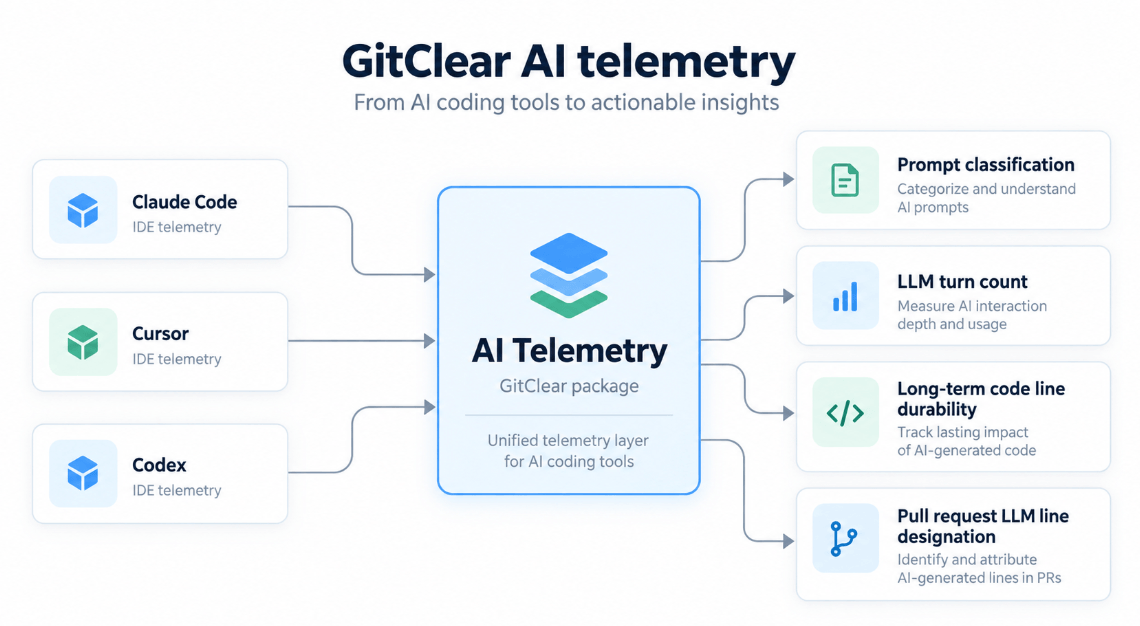
GitClear's workstation telemetry is what makes per-line AI attribution possible. It fingerprints the lines an AI agent writes, so that when the work is eventually committed, GitClear can report which lines survived verbatim, which a human rewrote afterward, and which model produced them. No AI provider API offers this granularity as of 2026.
Now available via npx: Telemetry agents that go beyond Otel to capture what matters
One npm package now installs that instrumentation for Claude Code, Cursor, and Codex — whichever of the three it finds on the machine.
This page covers the self-install path: one developer, one command. System administrators deploying to a fleet should skim this page, then continue to "Rolling out across an organization" below.
linkStep 1: Copy your personalized install command
Visit https://www.gitclear.com/ai_telemetry_js while logged in to GitClear. The page retrieves your entity's API token and shows a copy-ready command:
If you use a self-hosted (Enterprise) GitClear instance, replace www.gitclear.com in that URL with your own GitClear host. The command shown on your own instance already includes the matching --host flag, so a copy-paste does the right thing.
linkStep 2: Run it
Paste the command into a terminal — macOS, Linux, or Windows (PowerShell or Command Prompt) — and press Enter. The installer will:
Detect which agents are present by looking for ~/.claude, ~/.cursor, and ~/.codex
Create a per-user install directory. No sudo or admin elevation is required
Save your token to config.json with owner-only permissions (mode 0600 on Unix)
Download the current telemetry script for each detected agent
Register the hooks for each agent, preserving any hooks you had already configured
Every run closes by naming what completed, with the installer version used for each agent:
When more than one agent is detected, each is installed with the same GitClear configuration. If one agent's installer fails, the run stops there and the output names the agents that never ran, so you can rerun after fixing the problem. Telemetry begins with the next session you start in each agent; sessions already open are unaffected.
linkWhat gets installed
Agent | Hooks registered in | Telemetry script |
Claude Code |
|
|
Cursor |
|
|
Codex |
|
|
The scripts and your token live together in a single per-user directory:
macOS, Linux |
|
Windows |
|
Existing hook configuration is merged rather than replaced, and Claude's settings.json is backed up alongside the original with a .gitclear-backup-<timestamp> suffix before it is modified.
Requirements: Node.js 18 or newer, and at least one of Claude Code, Cursor, or Codex.
linkKeeping the scripts current
The telemetry scripts are updated multiple times per week during 2026, as new hook events and new agent capabilities become available. The npm packages change much less often. To pull the newest scripts for every installed agent:
We recommend running this at least once per week. It re-downloads the scripts in place — your settings and token are untouched, and no agent restart is needed. The updated script takes effect on the next hook invocation.
linkRotating a token
Run the same command as a first-time install, with the new token. The old token is replaced:
To change the token without re-downloading anything, use --set-token instead.
linkChoosing which agents to instrument
Detection is the default. Override it per agent when you want telemetry on an agent you have not run yet, or want to skip one you have:
| Install for this agent even when its config directory is absent |
| Skip this agent even when it is detected |
| GitClear API key (or set |
| Update authentication on an existing install |
| Re-download the installed telemetry scripts |
| Enterprise GitClear origin |
| Custom install directory |
| Describe what would change, write nothing |
| Remove the selected telemetry integrations and unregister their hooks |
| Skip confirmation prompts |
Flags other than the agent selectors are forwarded to each agent's installer, so --dry-run, --update, and --uninstall all apply to every agent selected in that run.
linkVerifying the install
Claude Code: run /hooks inside Claude. You should see PostToolUse referencing claude-telemetry.mjs. /status confirms which settings source is active.
Cursor and Codex: confirm that ~/.cursor/hooks.json and ~/.codex/hooks.json contain commands pointing at cursor-telemetry.mjs and codex-telemetry.mjs.
All agents: the install directory (~/.gitclear/) should contain the telemetry script for each agent plus config.json.
In GitClear: telemetry-derived attribution appears in your AI usage stats once the instrumented work has been committed and the repository has been imported. Fingerprints are matched to commits, so a developer who has not yet pushed will not appear.
linkRolling out across an organization
Administrators who want telemetry running on every developer machine, without asking developers to do anything, have two workable strategies. The npm installer supports both.
Scripted install via your existing config management. The installer is non-interactive when stdin is not a TTY, and --yes skips confirmations, so it drops cleanly into Ansible, Chef, Puppet, an Intune remediation script, or a Jamf policy:
A few pointers worth knowing before pushing this to a fleet:
The token from https://www.gitclear.com/ai_telemetry_js belongs to your GitClear entity, not to an individual, so one token serves the whole rollout. Developer identity is derived from git, not from the token.
Run with --dry-run on a representative machine first. It prints every file it would touch.
Name the agents explicitly (--claude --cursor --codex) if you want telemetry in place before a developer's first session, since detection only finds agents that have already run once.
Pass --path to force a consistent absolute install path across the fleet, which makes later verification and managed-settings references straightforward.
Schedule --update weekly on the same channel you used to install, so the scripts stay current without further attention.
This installer writes per-user settings, which a determined developer can edit. Where tamper resistance matters, use the managed-settings path instead.
Managed settings / MDM deployment. For Claude Code, hooks can be delivered through Anthropic's Admin Console, macOS MDM, Windows GPO or Intune, or a system-level managed-settings.json, producing hooks that developers cannot override (allowManagedHooksOnly). That path — including copy-ready Ansible, Chef, Jamf, Kandji, GPO, and Intune configuration, fleet-wide verification scripts, and a troubleshooting matrix — is documented in detail here: Claude Code telemetry: Evaluating per-line AI changes written by Claude.
As with all GitClear features, telemetry data is bound by GitClear's Developer-Friendly Analytics policy, so it cannot be used to unfairly target individual developers.
linkWhy is GitClear telemetry separate from OpenTelemetry?
A reasonable question from teams that already run an observability stack: if Claude Code and Cursor can export OpenTelemetry, why install anything else?
Because OpenTelemetry is a pipe and a naming scheme, not a sensor. The GitClear scripts run on the workstation, read prompt text and edit bodies locally, and transmit only derived fields. Vendor OTel exports what the agent already chose to emit, which is a different grain and a different privacy contract. The overlap is usage observability, not the attribution data GitClear's reporting is built on.
Field by field:
Prompt category without storing prompt text. GitClear classifies the prompt on-box and sends only the resulting enum. Claude Code's OTel redacts prompt text unless you set OTEL_LOG_USER_PROMPTS=1, which ships the full prompt — and there is no category attribute either way. Cursor Enterprise OTel carries no prompt content at all. A collector cannot classify text it never received.
Prompt length and file-reference count. Claude Code does emit prompt_length without the text; this is the one true overlap. File references do not match: GitClear counts unique @path mentions (and Cursor attachments), while Claude's at_mention events skip many mentions and omit the path. Cursor Enterprise exports neither.
Turn count and per-turn category. Turn count is derivable from Claude's prompt.id / interaction.sequence. Category is not. GitClear additionally salts a prompt fingerprint with session and occurrence, and threads a parent fingerprint, so multi-turn work can be reconstructed. Cursor's conversation id is session-scoped, not turn-scoped.
Hashed inserted lines. This is the decisive gap. GitClear fingerprints each non-blank added or removed line with a hash that GitClear later joins to git commits. Claude's OTel offers claude_code.lines_of_code.count, an aggregate counter by model; even with tool-detail logging enabled, tool input is truncated (roughly 512 characters per value). Cursor Enterprise reports tool-call counts only — no file path, no edit body, no hashes. A collector cannot hash lines that never arrived.
Model that wrote those lines. Both vendors know the model on the API request, and GitClear attaches it to the same event as the line changes. OTel can say "this session used Sonnet"; it cannot say "these fingerprints were written by Sonnet," because the fingerprints are not in the stream.
Nor does a modified OpenTelemetry deployment close the gap. Pointing vendor OTel at GitClear yields length, turn ids, model, tokens, cost, and line counts, but no repo attribution (git path, HEAD sha, committer email). Hashing or classifying inside a Collector processor requires raw content on the wire — a privacy regression compared with hashing on the workstation — and the edits arrive truncated anyway. Third-party "otel hook" wrappers subscribe to the same UserPromptSubmit / afterFileEdit / PostToolUse hooks GitClear already uses and re-encode them as OTLP, usually with plaintext prompts and edits; that is rewriting the scripts, not replacing them.
OTel remains a useful complement for cost, cache tokens, tool latency, and cloud-agent lifecycle — signals the hooks are weaker on. It is not a substitute for the workstation sensor that turns an edit into a fingerprint GitClear can match to a commit months later.
linkTroubleshooting
Symptom | Likely cause | Fix |
| None of | Name the agents explicitly with |
| Node.js older than 18, or not installed | Install Node.js 18+ and rerun |
Install succeeded, but no telemetry in GitClear | The install ran without a token, or the developer's repository is not imported into GitClear | Run |
Hooks do not fire in a running session | The agent session started before the install | Start a new agent session |
Codex hooks are ignored |
| Confirm |
Events are cached but never reach GitClear | Outbound HTTPS to your GitClear host is blocked by proxy or firewall | Allow outbound HTTPS to |
One agent installed, a later one did not | A failing installer halts the run | Read the closing lines: they name the agents that never ran. Fix the reported problem and rerun |
linkWhat "is and "is not" transmitted
All telemetry scripts
Do not transmit source code lines and
Do not record or transmit prompt text
What they do send is derived on the workstation (client): one-way hashes of the lines an agent added or removed, the model that produced them, and prompt metadata such as character length, file-reference count, turn count, and prompt category. Your API token is stored locally with owner-only permissions.
GitClear's workstation telemetry is what makes per-line AI attribution possible. It fingerprints the lines an AI agent writes, so that when the work is eventually committed, GitClear can report which lines survived verbatim, which a human rewrote afterward, and which model produced them. No AI provider API offers this granularity as of 2026.
One npm package installs that instrumentation for Claude Code, Cursor, and Codex — whichever of the three it finds on the machine.
This page covers the self-install path: one developer, one command. System administrators deploying to a fleet should skim this page, then continue to "Rolling out across an organization" below.
linkUse with Diff Digest (macOS downloadable app)
In addition to its flagship developer metrics, GitClear offers Diff Digest as a downloadable, offline-first diff viewer for developers who want to review less code.
Out of the box, Diff Digest will consume your locally-generated telemetry events. If you are a customer of GitClear's developer metrics, we will first submit the telemetry events to the standard GitClear endpoint.
In either case, after checking whether to submit telemetry to GitClear, the telemetry script will subsequently look for a Diff Digest install. If the app has been installed and is running, it will receive and process the telemetry events from your agents, as they are generated (i.e., when you make a new commit or 10 minutes pass since your activity).
Being able to see how much of your own work was generated by certain agents can allow you to browse directories, commits and pull requests alongside data on what models were used to produce the lines being browsed.