GitClear's Model Context Protocol (MCP) integration lets an AI assistant retrieve GitClear data while you work in a conversation. Ask a question, let the assistant fetch the relevant report, and follow its source links back to GitClear.
link1. What you can do with GitClear MCP
Use MCP to turn repository activity into a conversation: find the repositories you shared, retrieve Diff Delta for a date range, compare periods, and ask follow-up questions without assembling API requests yourself. An assistant can use the returned values to prepare a summary or, when supported by the assistant, a table or chart.
The initial release provides two read-only tools:
list_resources: discover the selected repositories and accessible teams in the connected GitClear organization.
get_report: retrieve historical Diff Delta for one selected repository, optionally scoped to a team.
Diff Delta measures code-change activity; it is one input to understanding progress. Interpret it alongside the work delivered, quality, and team context.
Current scope: MCP does not yet expose AI adoption or AI usage metrics, context-file contents or usage, audits, source code, review discussions, developer-specific reports, or forecasts. An assistant cannot establish how context files affect progress from Diff Delta alone.
link2. Connect your assistant to GitClear
You need a GitClear account with access to the repositories you want to share and an assistant that supports remote MCP over Streamable HTTP, OAuth, and protocol version 2025-11-25. Client-specific setup and account requirements vary; contact GitClear support for help choosing a compatible client during the pilot.
Open your assistant's remote MCP connection settings. Add a connection named GitClear with this server URL:
https://www.gitclear.com/mcp
Select OAuth authentication, if your assistant asks for an authentication method. Compatible clients register automatically; you do not need to create a REST API token or paste a credential into chat.
Follow the sign-in flow to GitClear. Review the requesting client's name and return address. The client supplies its own name, so check the address as well.
Choose your organization and the repositories to share. Allow List selected repositories and teams and Read reports. Allow Stay connected between visits only if you want the assistant to retain access between visits.
Select Allow selected access, return to the assistant, and ask: “List the GitClear repositories I shared.”
Each connection is tied to one organization and the repositories you selected. To access a different organization or change that selection, authorize a new connection.
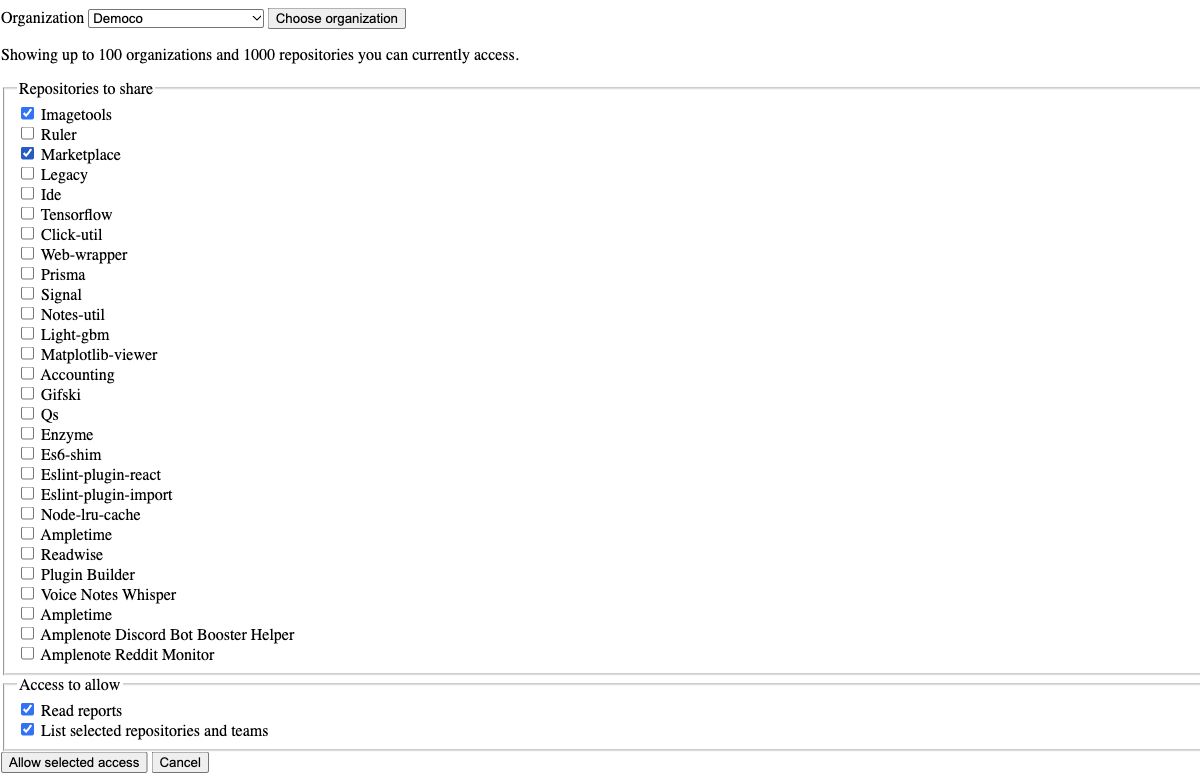
Choose the repositories your assistant can read.
link3. Ask questions and follow the evidence
Start with a specific repository and period:
“For the repository I select from your GitClear list, show Diff Delta for the last 30 days. Include the reporting timezone and source links. Explain any missing data.”
For a useful follow-up:
“Compare the two most recent complete calendar months for the same repository and team. Show the totals and percentage change, using comparable report intervals. Keep observed changes separate from possible explanations.”
The assistant may make several tool calls to answer one question. It can discover the repository ID, request each period, and explain the result. Ask it to use returned values and source links, and to state when a question needs data the integration does not provide.
Exploring a context-file rollout: supply the rollout date yourself, then ask:
“We introduced our context-file guidelines on [date]. Compare Diff Delta in equal periods before and after that date, excluding the rollout day. Keep the repository and team fixed. Describe the activity change, and explain what additional evidence we would need to assess whether the guidelines helped.”
That comparison can identify a change worth investigating. It cannot measure adoption, determine who used a context file, or attribute a change to AI.
Screenshot 2 to add: a real assistant response showing the before/after comparison, a small table or chart, and clickable GitClear sources. Caption: “Compare activity around a rollout, then investigate what changed.” Prompts and capture guidance.
Reports default to the last 30 inclusive days and accept up to 366 inclusive days, within the history available to your subscription. Dates use YYYY-MM-DD and cannot be in the future. Results include the reporting timezone, actual chart interval boundaries, units, and source links. Check those boundaries before comparing totals; missing observations and a report with no source data should not be treated as measured zero activity.
link4. Access, subscriptions, and usage limits
GitClear MCP is available with an eligible active paid subscription or trial. Basic trials have a daily budget of 5 discovery/report calls per user per organization; Plus trials have 10. The budget is shared across that user's MCP connections and resets at midnight UTC. One question can use several calls, so keep trial questions focused on one repository and a short period.
Your assistant can read only the repositories you approved and can currently access in GitClear. Permissions are checked again on each call, and report history follows your subscription. The initial tools are read-only.
To review or revoke access, open Account Settings → Assistant Connections. You can inspect the client, organization, permissions, repositories, last use, and expiry, then select Disconnect. Disconnection stops subsequent requests and token refreshes. Results already returned remain subject to the assistant's own history and data controls.
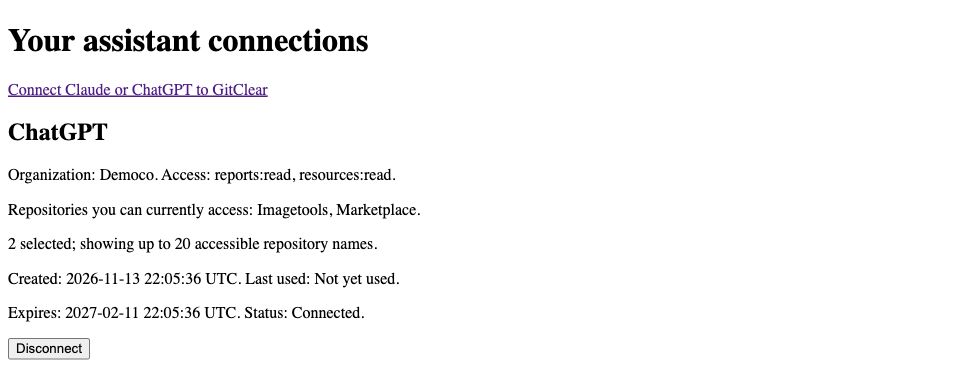
Review the repositories an assistant can access and disconnect it at any time.
link5. Troubleshooting and technical reference
Cannot connect: check the exact server URL, your client's remote MCP/OAuth support, and whether the GitClear pilot service is enabled.
Repository or team unavailable: check your GitClear permissions and the connection's selected repositories. Authorize a new connection if you need a different selection.
Report unavailable or empty: try a recent, shorter period within your subscription's history. Confirm the repository has recorded data. Unsupported metrics require another GitClear reporting path.
Request limit reached: follow the retry guidance returned by the service. Rate limits and a trial's daily allowance are separate constraints.
Authorization expired or disconnected: reconnect through GitClear's sign-in and consent flow.
For tool inputs, scopes, and response details, see the GitClear MCP API reference. If you need help, contact GitClear support with the approximate time and the step that failed. Keep credentials and authorization callback URLs private.