Since the debut announcement of our AI integrations this past December, we have been continuously expanding our AI measurement capabilities for our customers. GitClear developers, like our customers, are thriving with newfound velocity:
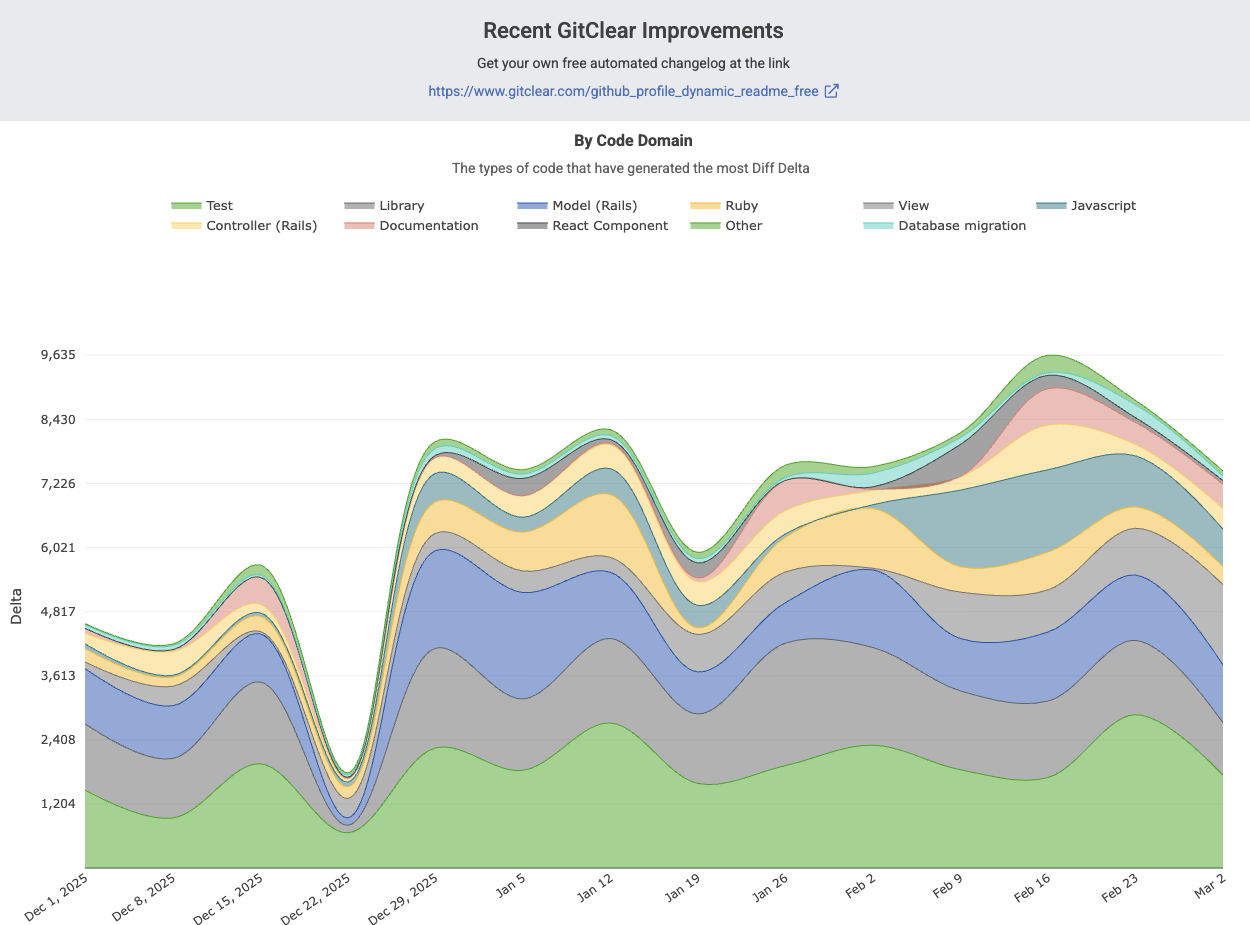
The difference in LLM-driven productivity is not subtle
If you haven’t seen the velocity of your team increase substantially in the past 6 months, we regret to inform: you're probably doing it wrong?
In case you didn’t have time to sift through the latest AI velocity research data, published in January: the fastest developers keep getting faster.
We can summarize the quarter's changes as follows:
The biggest change for the quarter has been upgrading AI usage stats from all the major AI usage providers: Copilot, Anthropic, Gemini, and Cursor. All of these providers can now return the amount of AI usage per developer. Furthermore, the providers can each be used to draw a correlation between greater AI use and any other metric that you're curious about.
link🛩️ GitHub Copilot: Upgrade to v2 API for per-developer stats, every-team LLM visibility
3 months ago, Copilot customers could only receive AI usage stats per team (vs per-developer), and at that, only teams that were set up on GitHub.
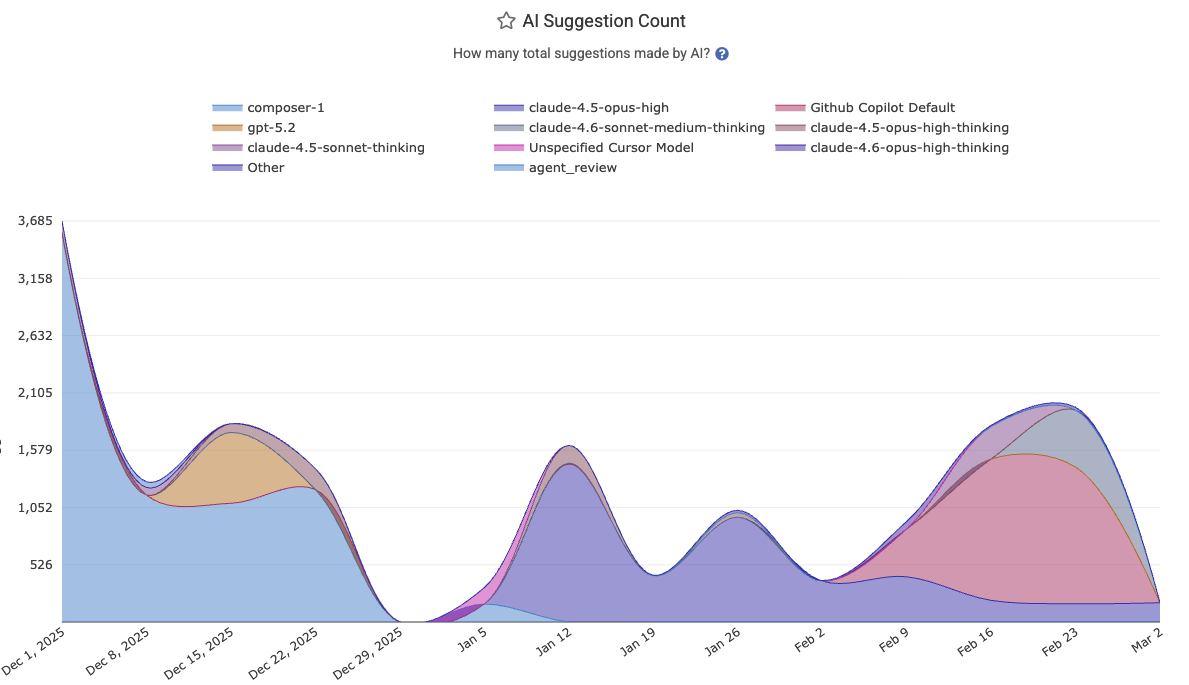
AI Suggestion Counts now available for any team with Github Copilot
Thankfully, GitHub released a new analytics implementation that allows us to retrieve AI usage data per-developer. This is a huge upgrade for Copilot users. Now, you can:
See AI usage stats for every team you’ve set up on GitClear. Whether the team exists on GitHub (synced with our GitHub team sync feature) or not is no longer relevant
Per-developer AI Cohort stats can be calculated historically, back through the debut of the updated Copilot API in December. Previously, we could only evaluate the AI Cohort stats starting from the date that the customer signed up for GitClear
Have your AI use attributed per-repo - more on that in a bit
link🔌 Support for all Claude Code Analytics APIs, Cursor, plus Gemini Code Assist
Prior to this quarter, users could connect to Cursor, or to Copilot with an anonymized (non-dev-specific) API.
After this quarter, customers can connect to:
Cursor
Github Copilot v2 API
Claude Code Platform Analytics API
Claude Code Team Enterprise API
Gemini Code Assist
We've also expanded the AI Usage charts so they offer several new types of dimensionality, including "per-committer" and "per-model" stats. This allows teams to understand which developers are getting the most of out which LLM models in a given month (life comes at you fast when you're a developer in 2026):
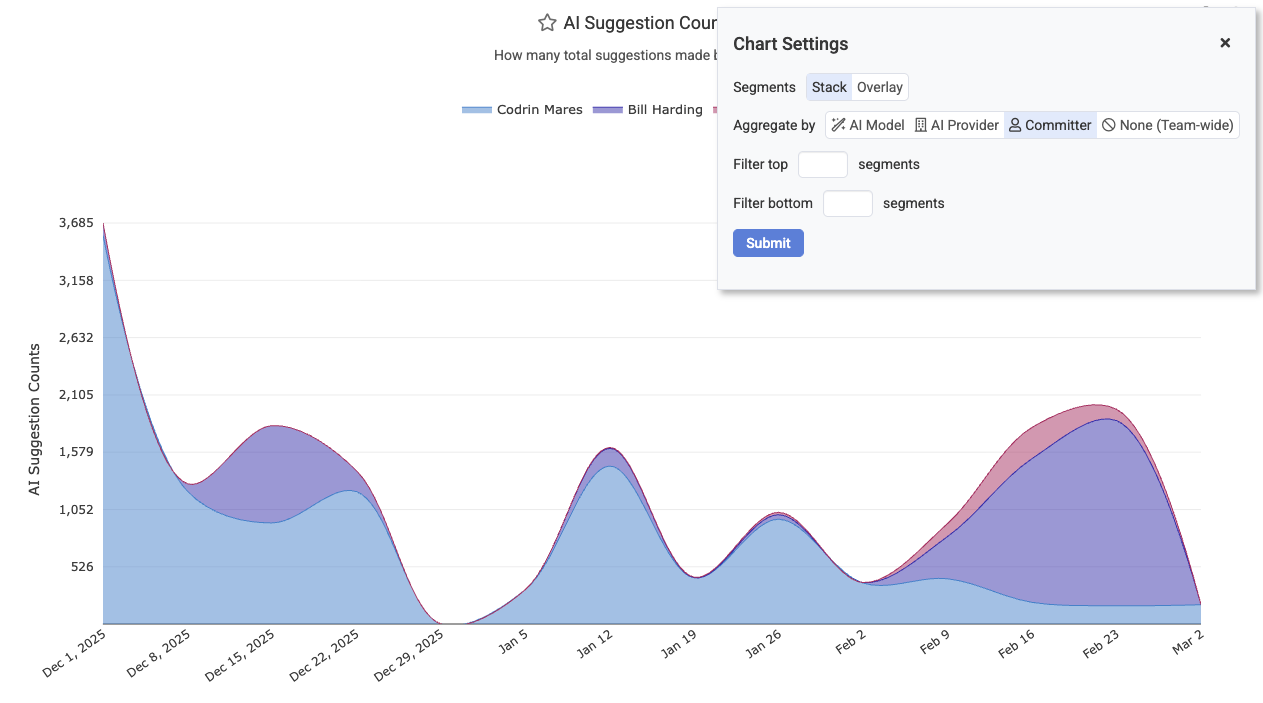
Segment AI usage, acceptance rate, and more by AI Provider, developer, or AI model
To set up AI usage stats, you can read help instructions on our AI usage setup page.
link🎯 Per-Commit AI Attribution
Of course, it's one thing to know how much your API providers report that AI is being used. It's another thing to know where it is being used. Being able to understand how much of your various directories are AI-authored helps to contextualize the defect risk, and the degree to which the code has been thoroughly vetted:
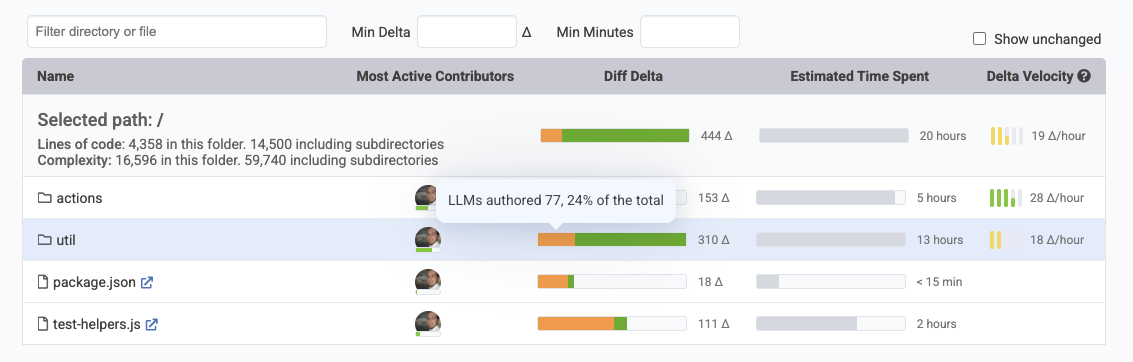
Directory Browser now includes breakdown of how much Diff Delta was AI vs human-authored
Every week, we have improved our capabilities to detect which lines are AI-authored. As of this update, we currently have about 10 heuristics in use to recognize the vast swath of AI authorship being experienced across the industry.
But we can do better. Because this quarter, we also began breaking down AI use reported by providers into the constituent repos that this code is being contributed to. This catches the cases where the commit itself might not contain the usual demarcators of AI authorship, but the backend API still suggests the truth about the origin of commit authorship.
The work that is recorded per commit is now separated from the work that humans are authoring per commit. This makes it possible to see the percentage over time of code that is being authored and persisted from LLMs versus developers themselves.
link🤓 Improvements to Pull Request and Ad Hoc Code Review
Since LLMs are leading us to become ever-more engaged with code review and less engaged with code writing, the importance of fast code review continues to increase. That's why we've made a number of upgrades to our PR review tool during the past quarter. Reminder: It is still averaging a 25-30% reduction in code to read vs. traditional diff tools.
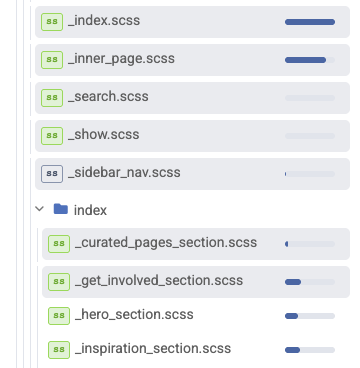 | Diff File List |
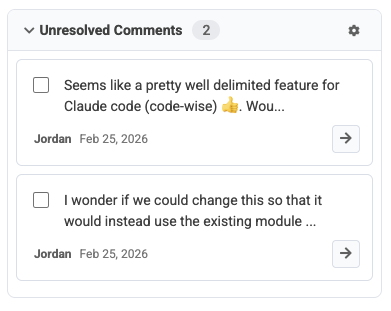 | Specific list of comments pending review in sidebar |
This is in addition to the existing advantages of GitClear PR review, like:
Automatically mark files as reviewed by scrolling
Recall which specific commits have been reviewed per-file, so you can review a PR in piecemeal form over multiple visits, only seeing new changes
Recognize "moved," "updated," "find/replace" and "copy/paste" lines, so you don't need to wonder if that big block of deleted code is going to show up again as "added" code a few files down
Get a breakdown of how much "test coverage" the PR contains relative to norms for the repo
Notifications if a pull request gets stuck at any point during the review => commit => review process
We hope that more customers will try out this rapidly improving feature in order to save 10–30% of their time reviewing code that is being authored on their behalf.
link🎁 Upgrades to Notifications: Weekly Highlights
Another major improvement from this quarter was the addition of achievement notifications.
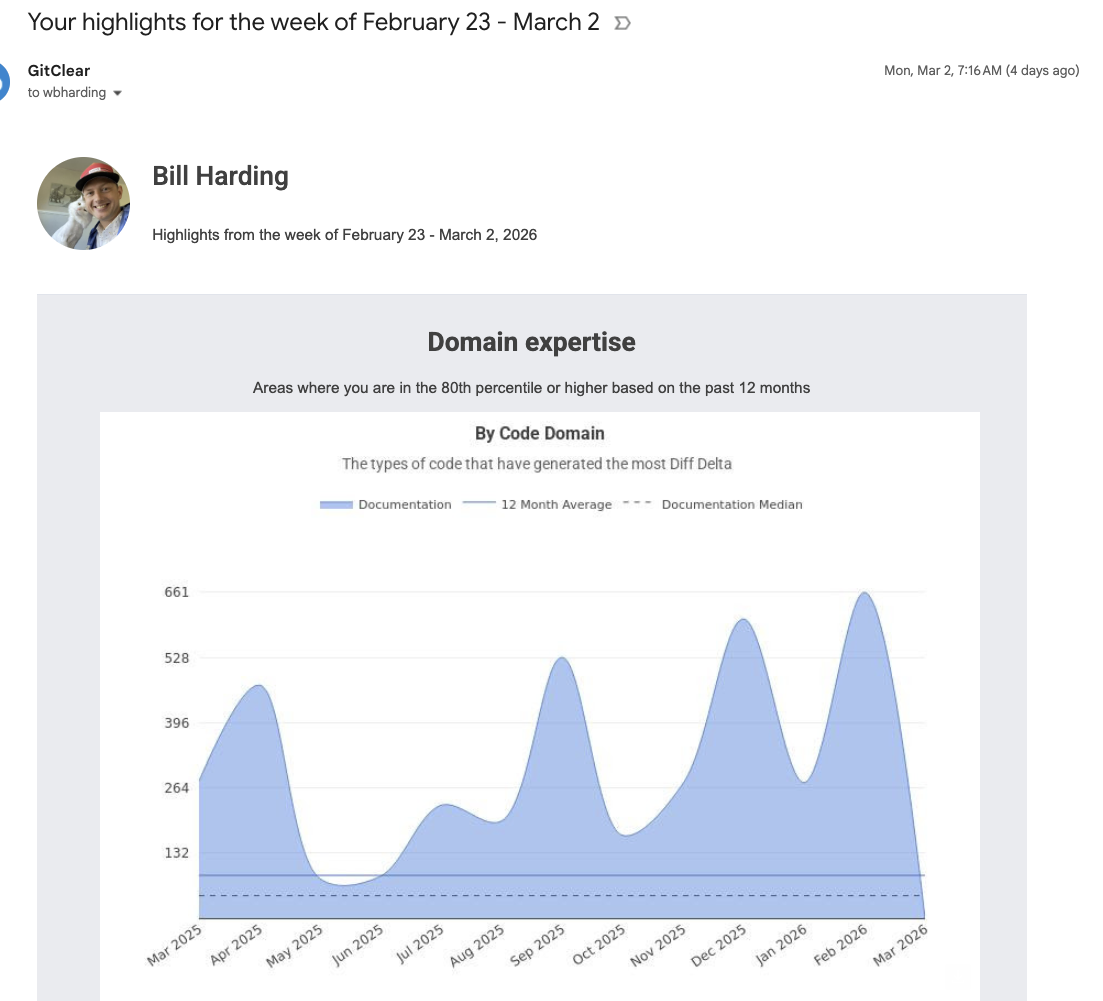
Delivering images that can help show off to the boss since 2025
There are now about 10 different types of achievement goals that customers can set up to receive notifications when their team (or themselves) are having a fantastic week for "deleting code," "changing durable code," "closing important issues," and lots more.
link🔍 MCP Code Line History Endpoint
A final tool in the toolkit GitClear offers for the LLM-enabled generation of developers: a new API endpoint to retrieve a detailed, move-following history of any line of code.
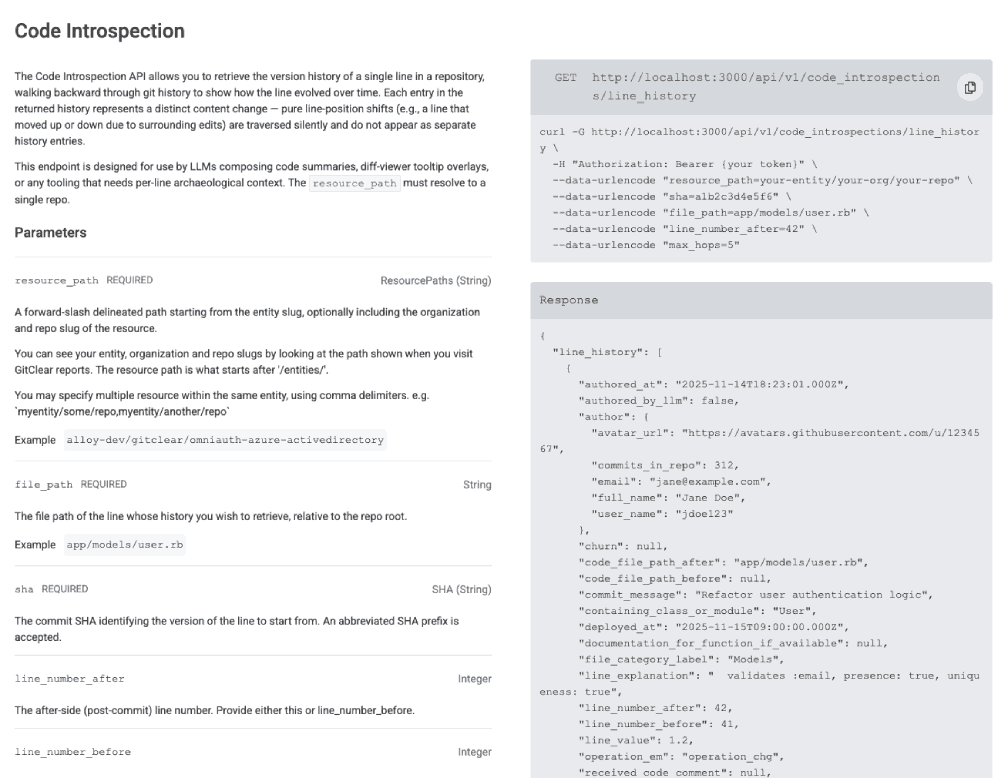
Rich history of any code line, optimized for LLM use
When your exception index receives a new notification, why note automate the process of retrieving the history of the line that triggered the error?
link💻 More Changes
A number of smaller updates were driven by customer requests and by our own needs to document progress.
linkSnap Changelog Improvements (Interactive)
It is now possible to publish your team's commit history in a visual, drag-to-navigate through time visualization. This simplifies the process of understanding what the team has been working on in the past few weeks.
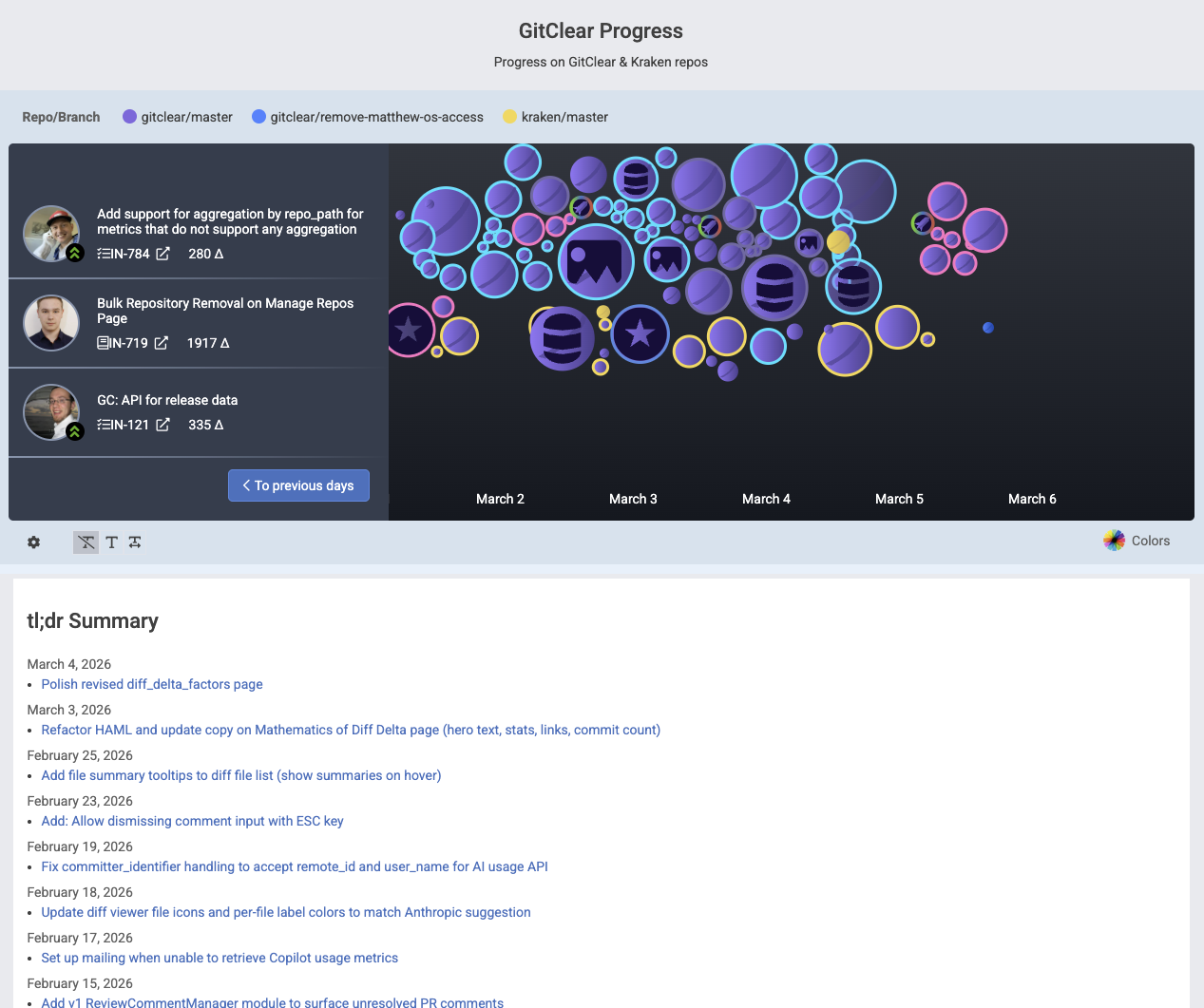
Embeddable means to navigate recent commit history, with a tl;dr of what is getting done
That is to say, your most recent releases are listed alongside your current commits, and within each release, you can see what issues and ad hoc work were accomplished during that release cycle.
linkSummary of work pending release
Below the Commit Activity Browser, we now show a summary of the changelogs (merged pull requests, work on issues) that have been recently released, or are pending release:
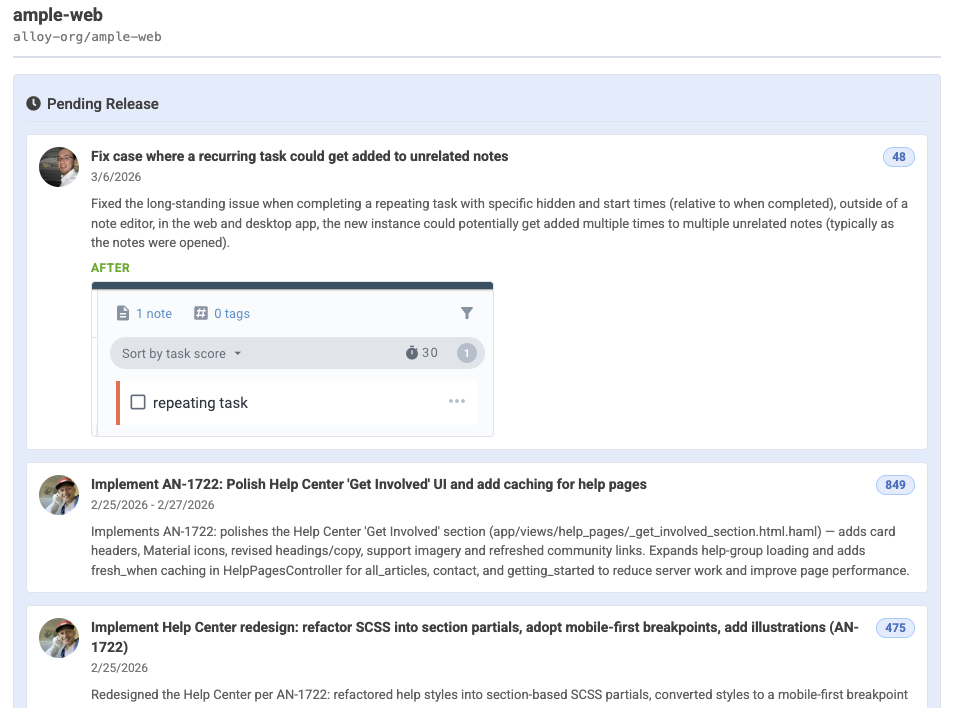
See recent changes in English, with screenshots
This is a great way to recognize when a deploy is due, and to summarize what work is getting done as your team engages "warp speed" with Claude Code.
linkUpgrades to Diff Delta Explanation
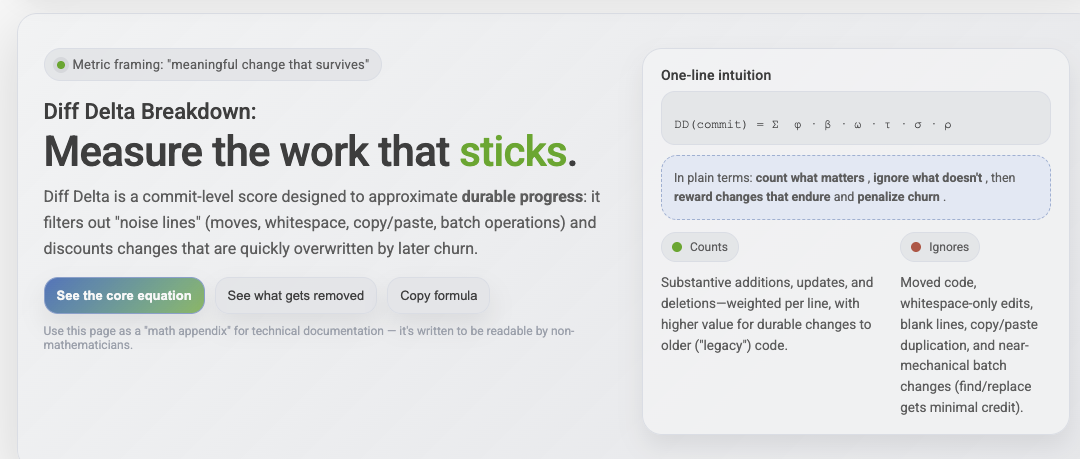
One of the common hurdles that new customers face when introducing GitClear to their team is "how do I explain how this 'Diff Delta' metric works?" and even "How do I know that Diff Delta is any better than 'Commit Count' or 'Changed Line Count'?"
We've launched two new pages to help answer these questions, expressing Diff Delta in terms of the mathematical constructs it uses to transform 100% of changed lines down to the 3% of changed lines that are durable and meaningful:
link🔮 What's Next?
Our immediate plans are to continue collecting data to map out how much code is being authored by which models, and what correlations exist between the different models being used and the outcomes that the team observes afterward.
For our upcoming research project, we have three ideas. Let us know if any of these sounds more interesting or applicable than the others to pursue:
What is the per-developer multiplier for how much AI use has accelerated velocity?
What types of tech debt have increased most during the past year?
What are the per-LLM-model acceptance rates? Which LLMs most often give rise to code that goes on to be implicated in a bug?
There is little doubt that a new level of opportunity has emerged, but for the next couple of years there will be a widening spread between those who apply the tools effectively, those who apply the tools haphazardly, and those who fail to apply the tools to their full potential.
GitClear is committed to helping our customers navigate their way to the first bucket.