As part of GitClear's suite of AI ROI tools, support for many LLMs is bundled into the basic GitClear subscription: Claude Code, Github Copilot, Cursor, Gemini and Augment Code can all be connected to retrieve per-developer detail about how much AI is being used.
One challenge to presenting robust AI team measurements is to ensure that GitClear can detect the connection between the developers reported by your Git provider (e.g., Github, Gitlab, Bitbucket, Azure) and your AI provider. In general, GitClear is able to handle this automatically by using a set of heuristics that checks for a match of "email address," "committer name," and other fields. However, sometimes the git provider does not supply a committer email address to GitClear, or the committer has cleared out their "Full name" field in git.
In cases where there are hundreds of committers associated with an AI provider account, it can sometimes be necessary (or advantageous) to explicitly specify which AI identity belongs to which committer. This page describes the options available to make an explicit connection between "committer" and "AI user"
link1. Mapping committers from the settings page
The fastest way to connect a small or moderate number of committers is from the Settings → AI Provider Committer Mapping page:
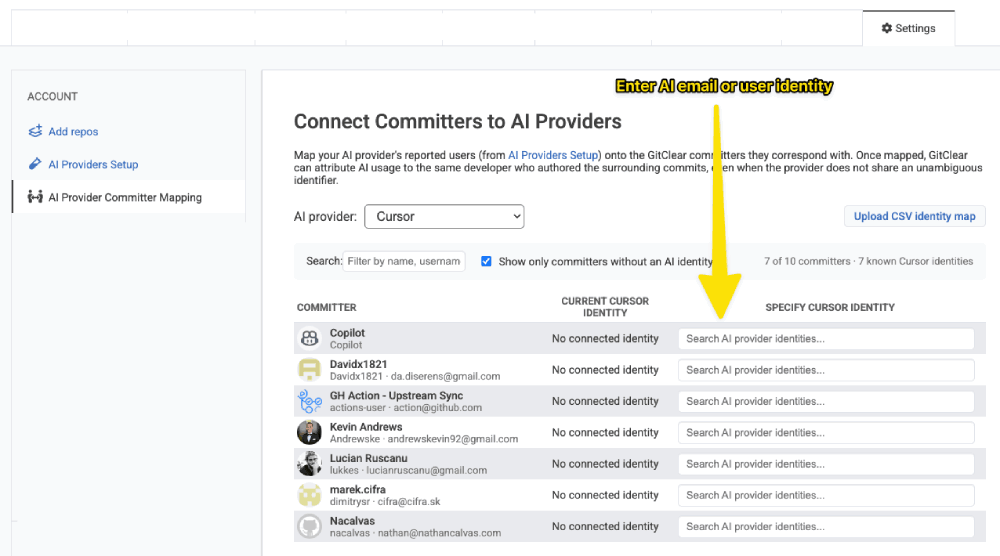
The AI Provider Committer Mapping page allows specifying AI identity for an unknown committer
That page shows a paginated table of every committer GitClear knows about for the current entity. Each row has:
The committer's full name, user name, and email (as reported by their commits)
A column for each AI provider you've connected — for example Cursor, Anthropic, Claude Code, Gemini, Augment
A searchable dropdown in each provider column, listing the identities that provider has reported but not yet attached to a committer
To create a mapping:
Find the committer you want to connect (use the search box at the top of the table — it matches against full name, user name, and email).
In the column for the AI provider, open the dropdown and choose the provider-reported identity that belongs to that developer.
The mapping saves immediately. A confirmation pill appears in the row, with an Undo link in case you picked the wrong identity.
When the dropdown for a provider is empty, it means the provider has not yet reported any unattached identities. Run a fresh AI provider sync (or wait for the next scheduled one) and the new identities will appear here.
link2. Mapping committers in bulk by CSV upload
For larger organizations — or when you already have a spreadsheet that maps your employees to their AI-tool identities — uploading a CSV is faster than clicking through the table. Use the Upload CSV Identity Map button on the same settings page.
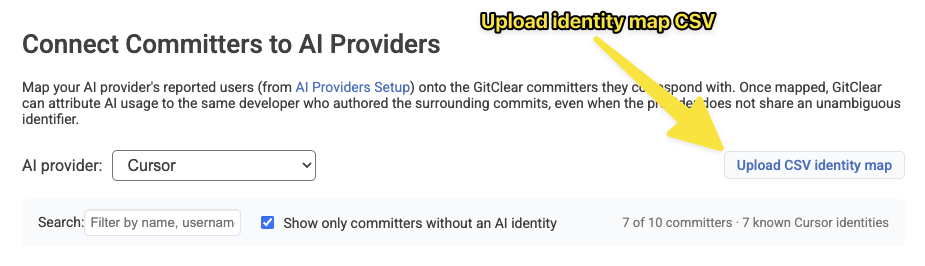
The button to upload an identity map is located in upper-right corner of the "AI Provider Committer Mapping" settings page
linkCSV format
The CSV must contain exactly one committer column (identifying who the developer is in GitClear) and a provider_identity column (identifying who they are at the AI
provider).
Column | Required? | Description |
| One of these three is required | The developer's email address as recorded in GitClear. Matched case-insensitively against any of the committer's nown email addresses. |
| One of these three is required | The numeric |
| one of these three is required | The committer's identity at their git provider (e.g. their GitHub login, GitLab username, Bitbucket account ID, or Azure DevOps identity) |
| required | The AI provider's identity string for the developer — typically an email, login, or opaque ID. |
| optional | The AI provider key (e.g. |
Either commas or semicolons are accepted as the column separator, so spreadsheet exports that use the European-style ; delimiter will import without modification.
After upload, the file is processed in the background. You'll receive an email summarizing what was connected, what was skipped with a warning, and what failed with an error — row by row.
linkExample 1 — Matching by committer_email
This is the simplest format. Each row is "this email at GitClear is this person at Cursor."
Use this format when your IT records key off of corporate email addresses.
linkExample 2 — Matching by gitclear_id
If you've exported the committer list from GitClear, you'll have unambiguous numeric IDs. Use these when developers share emails with bots, have multiple aliases, or when you want to be certain that the correct committer record is updated:
linkExample 3 — Matching by remote_id (with no ai_provider column)
If the developer's identity at their git provider (GitHub login, GitLab username, etc.) matches what's in your HR system, remote_id is a convenient join key. You can omit ai_provider when each provider_identity is already known to GitClear under exactly one AI provider:
linkExample 4 — Mixing identifiers and disambiguating providers
You can use whichever committer column makes sense per row — but only one column type per CSV. If the same provider_identity could match more than one connected AI provider (for example, the same email is reported by both Cursor and Anthropic), add the ai_provider column to disambiguate:
linkWhat the import does row-by-row
Match found, not yet connected → the provider identity is attached to the committer.
Match found, but the same committer already has a different identity for that provider → the new row is merged into the existing mapping and the duplicate is removed.
provider_identity is brand new (the AI provider has not yet reported it) → a new identity is created for the committer, provided you supplied an ai_provider column so GitClear knows which service to attach it to.
Committer cannot be found, or the row is missing a value → the row is reported in the email summary as an error or warning; no other rows are affected.