The Directory Browser seeks to address a few of the most common customer questions we receive:
What are the biggest changes to our repo during the last X months?
How much of our code is AI-authored? Where is the LLM-authored code concentrated?
Which developer is best suited to make an update to Y legacy feature?
Where have our developers been spending most of their time lately?
The Directory Browser can help illuminate all of the above:
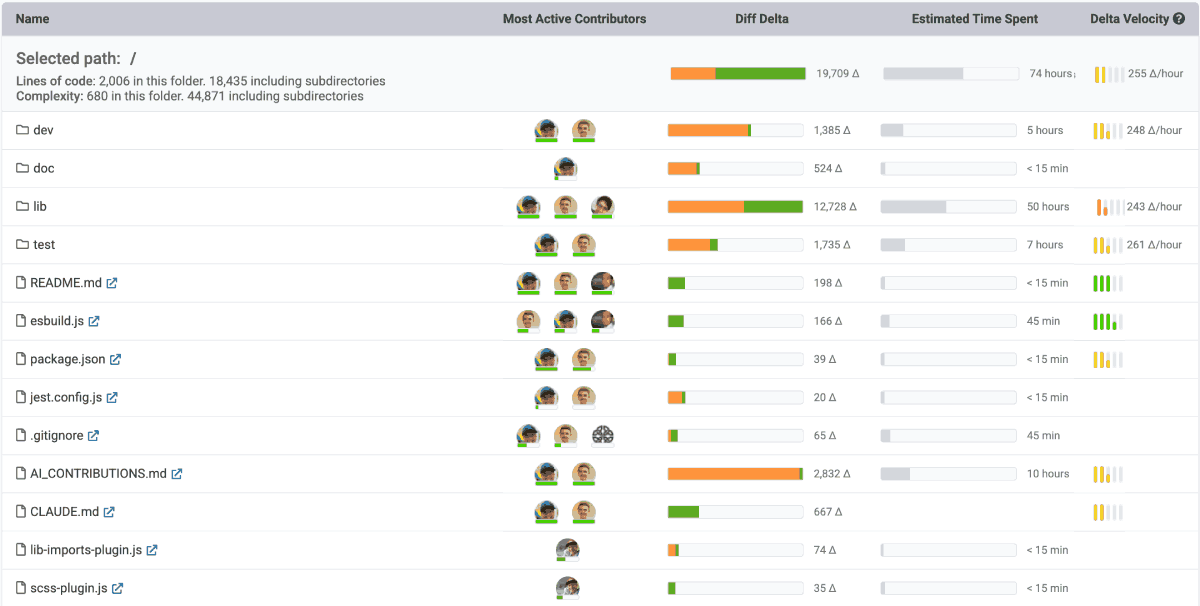
Browsing a directory allows understanding what fraction of the code was AI-authored
While the Directory Browser has insights for technical managers and C-level employees, it's probably most valuable for developers themselves. Read on to learn more about how its features combine to deepen your relationship with your repo data.
linkMost Active Contributors

For each directory or file in your project, we provide a list of which committers have made the biggest impact over the selected time range.
If you're a developer who has to maintain code in this directory, this is the fastest path to discover who to send your questions to. If you're a technical manager who knows the style of code written by their developers, this column foreshadows the style of code written. If you're a C-level sort, this is the fastest way to acquaint yourself with which developers have been working on what areas within your software.
linkHuman-Authored vs LLM-Authored Diff Delta
For each directory or file in your project, we'll show how much Diff Delta has been accumulated over your selected time frame. The orange fraction of the bar indicates how much of the file or directory was authored by an LLM:
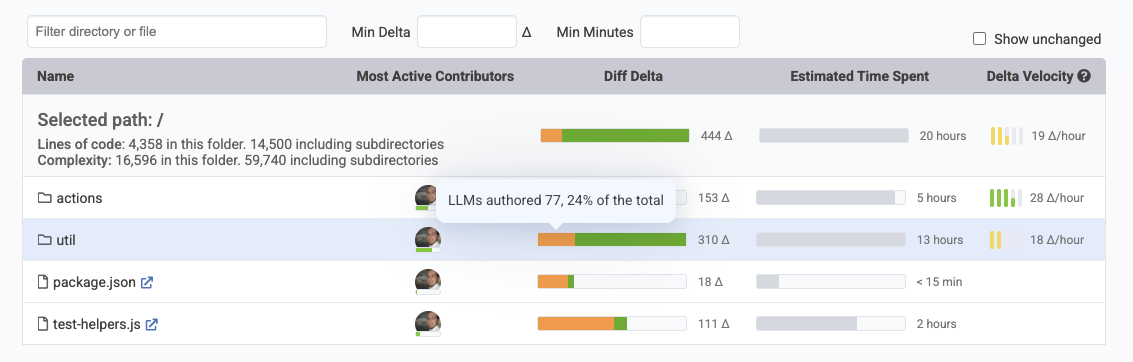
Navigate into a repo to understand how much work in each file and directory were AI-authored
If you're a developer, this information is golden when you're new to a project and trying to quickly grasp where the code is hiding. For example, if you're new to the Ruby on Rails repo and trying to understand where most of the the work has been happening during the past six months:
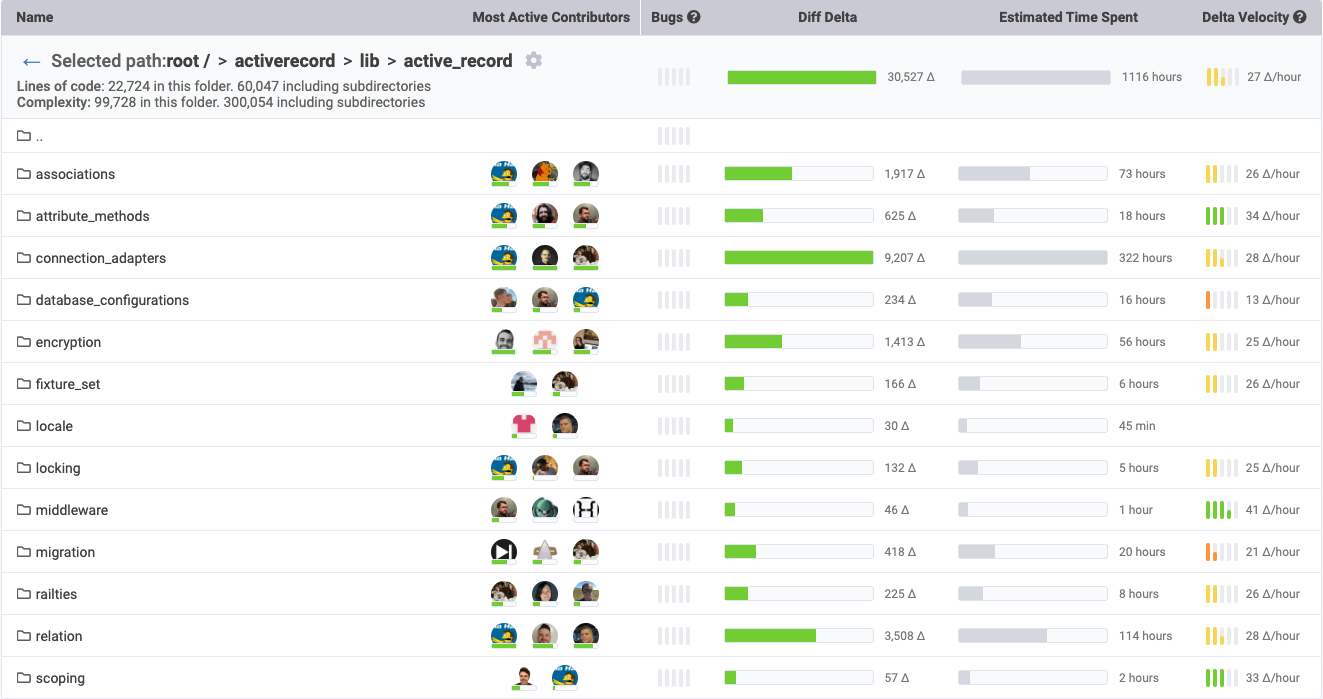
Past six months of activity in the Ruby on Rails Github repo: "Diff Delta" column
Aside from tests, the most work during the past six months has gone into connection_adapters and associations. Apparently Rails will be launching some juicy new features in those areas for Rails 6.1. Tip o the cap to user kamipo for making that happen.
linkEstimated Time Spent
Are you maintaining a legacy module that feels like its soaking up time, but you're not sure how much? Instant answers. Same if you're wondering whether tests and documentation are getting written.

When viewing the "All Files" tab, the Estimated Time Spent is the sum of time spent on all files in the selected directory, or in its sub-directories. For example, if Developer A changed the app/something.py file in a commit that took 1 hour, and Developer B changed app/models/fruits/banana.py in a commit that took 3 hours, then the "Estimated Time Spent" for the "app" directory would be 4 hours.
linkDiff Delta Velocity
To learn how the "Estimated Time Spent" is calculated for "Debt Inspector" tab, check out the the help page for Tech Debt Inspector.

Past year of activity in the GitClear repo: "Diff Delta Velocity" column.
For every file and directory in which 60 or more minutes have been accumulated, we calculate the quotient of Diff Delta / Estimated Time Spent. We make this same calculation against your repo as a whole to arrive at your average Delta Velocity (aka "Diff Delta per hour"), and the Delta Velocity of a particular file or directory.
Directories with higher velocity are places where one of the two things is happening:
Developers are able to get work done quickly & efficiently, thanks to low tech debt and solid documentation 🎉
Your Diff Delta settings are (intentionally or unintentionally) partial toward a certain type of work 😯
linkFile Selected
The first phenomenon is pretty self-explanatory. Directories with high velocity indicate low tech debt, and low tech debt make happy engineers.
The second case is a bit more interesting. If you use GitClear's recommendation of rewarding "documentation" and "tests" at a higher Diff Delta than standard code (to incentivize development toward those ends), then it's not uncommon to see test and documentation directories lead the way in terms of Diff Delta velocity.

Past six months of activity in the ReactFiberHooks.js file within the Facebook React Github repo
When you browse down to the individual files, we have one final click for developers: a specific rundown of who has been making the biggest commits within the file lately. When you want to chat about matters related to that file, these are your people.