
GitClear customers get a uniquely granular view into how AI is impacting their results, thanks to GitClear's proprietary diff processing engine. On this page, we'll describe how GitClear fuses data sources to answer actionable questions regarding "how much are we getting back from our AI spend?"
linkAssociating "Changed Line" and "LLM Author" using Commit Cruncher
Many who discover GitClear first hear about us via our seminal research on AI code quality - particularly the relationship between "AI adoption" and "growing propensity for code duplication."
This research is enabled by the "Commit Cruncher" processing engine, which is responsible for distilling git commits into the 3-5% of changed lines that are "durable," "meaningful," and "significant." This same engine is now used to reconcile "individual changed lines" with "the LLM that changed the line." By instrumenting individual changes to specific LLMs, GitClear customers unlock a broad range of reports to understand their team's AI use.
To read the finer details of how GitClear associates your team's "AI use" and "lines changed," read the final section of this document, on Ascribing "AI Use" to Changed Lines."
For more details on getting your AI provider connected to GitClear, here is the AI setup guide.
linkEvaluating outcomes of AI-authored code
There are a number of tabs and charts dedicated to presenting the outcomes of AI use.
linkAI Impact Stats
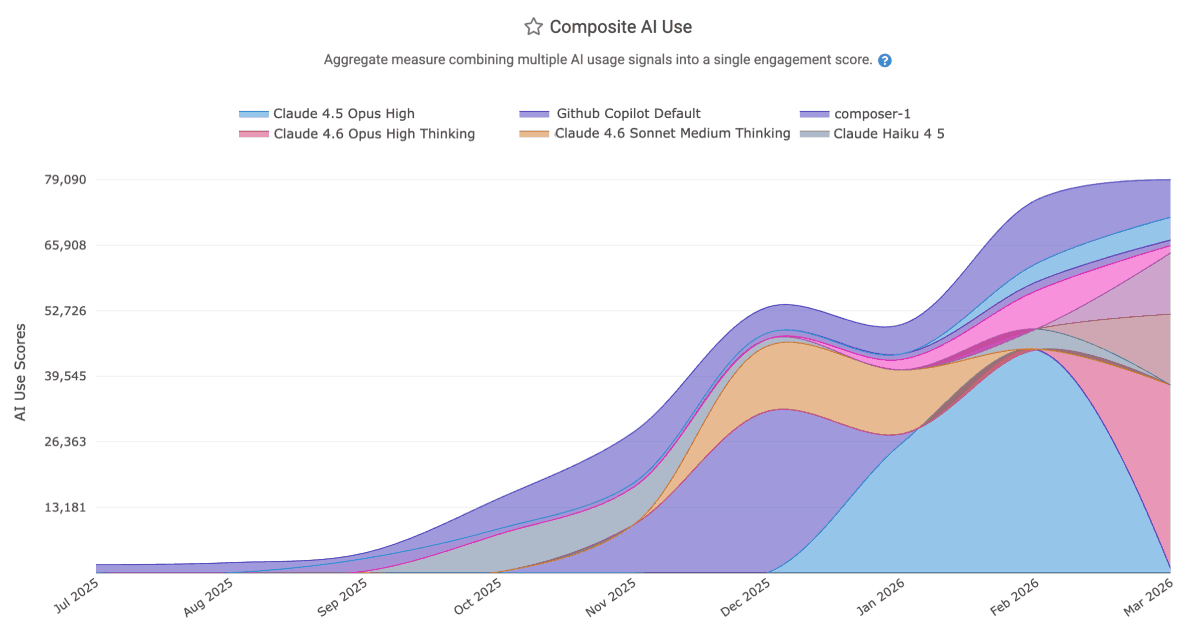
The AI Impact Stats answer questions like
Which LLMs are most popular within the team? ("Composite AI Use")
How much are the various LLMs (e.g., Opus 4.6 Thinking) and AI Providers (e.g., Claude Code, Cursor) charging us?
How many code lines are being added and deleted by each LLM?
Which team members have been the most and least avid AI adopters? ("Composite AI Use," aggregated by "Team Member")
Which LLMs are providing the highest quality suggestions ("Prompt Acceptance Rate" and "Tab Acceptance Rate")
linkAI ROI Stats
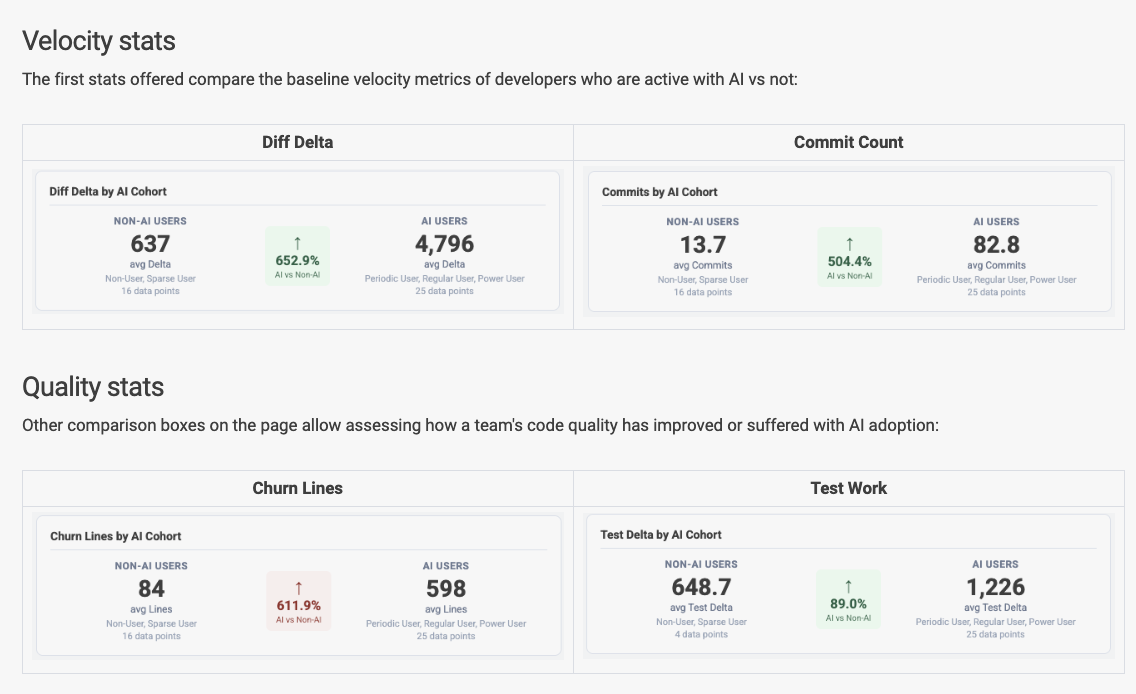
The AI ROI tab, available to Elite subscribers and those who have initiated a TrialPLUS membership, includes stats that allow per-team evaluation of the extent to which AI is changing outcomes:
Diff Delta
Commit Count
Team Code Review time
Churn Percent
Volume of Test Work
Copy/paste and Code Duplication
Story Points completed
PRs opened
PR Cycle Time
We add new stats to the ROI dashboard every month; if you're a subscriber that would like to see more AI stats, drop us a line with what you'd like to see?
linkAI Cohort Stats
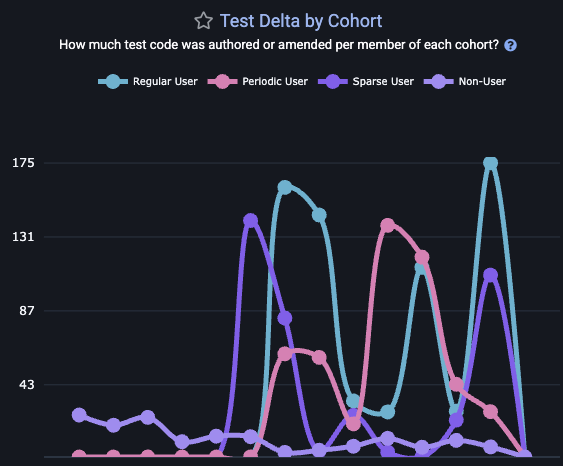 |  |
The "AI Cohort Stats" tab maps out the same differential metrics tracked by the AI ROI tab. The difference is that, instead of presenting the data as a binary comparison, "AI Cohorts" helps VPs, managers and developers to understand how the impact of AI is changing from week-to-week. As a team becomes increasingly proficient with AI, it is expected that the team's AI use will show progressive improvements to "velocity" and "quality" among those groups who use AI most.
If you find that your team's "Sparse User" or "Non User" demographics are outperforming the regular AI users, it is worth starting a discussion to understand how the development process looks different for the two groups. A manager can understand which developers have been most active with AI using the "AI Usage Stats," aggregated by "Team Member," to see which committers have the most/least code lines attributable to AI.
linkAI-Authored Files & Directories
What can be said about the "files," "directories" and "repos" in your company that are principally AI-authored? The Directory Browser will help you answer:
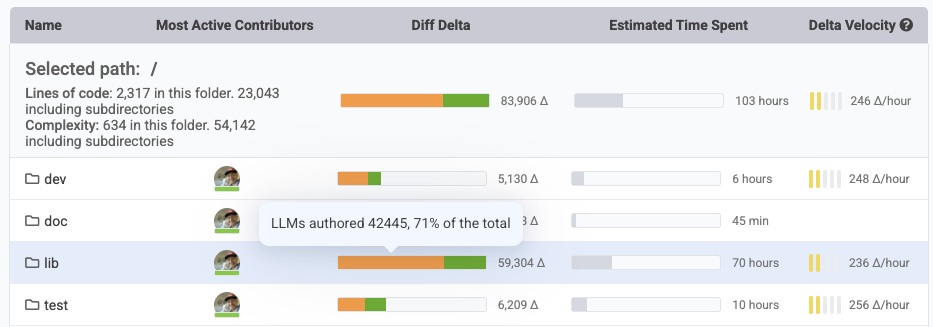
As you navigate your repos, the "orange" percentage of Diff Delta shown will indicate the percentage of all work that was performed by AI agents.
linkAI Surveys
One of the more popular methods recommended to contextualize how AI is helping or hurting a team is "developer surveys." GitClear's survey builder makes it trivial to send a recurring set of questions to ensure that your dev team has their collective voice heard in the evaluation of "how well is this AI spend serving us?"
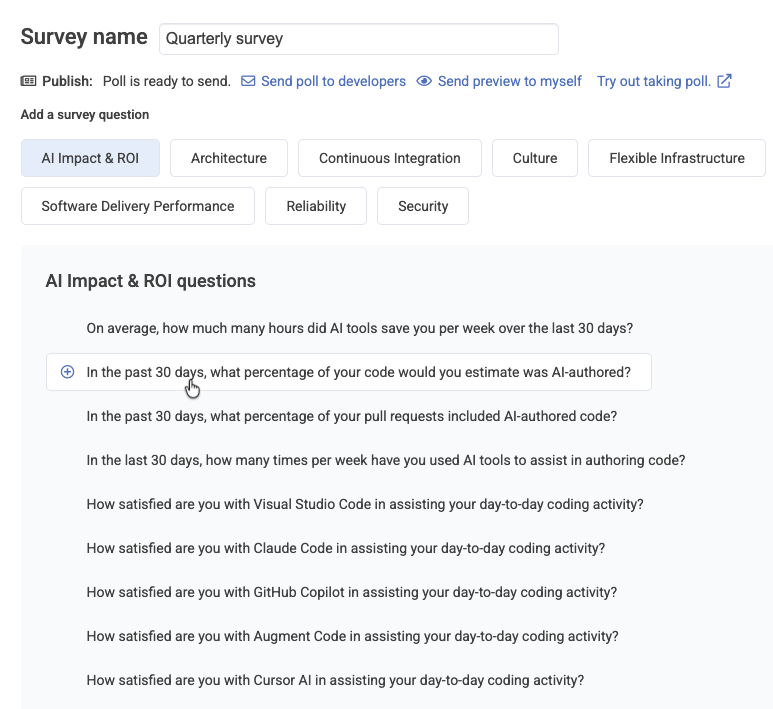
After clicking "Work in Review" from the top-level tabs, and "Developer Sentiment Review" from sub-tabs, you'll be able to choose the "AI Impact & ROI" category to delve into questions pertaining to the team's experience using AI.
Please contact hello@gitclear.com and we would be happy to help you set up and send your first developer sentiment poll.
linkMapping "AI Use" to "LLM Model" to "Changed Line"
GitClear allows customers to connect to the major AI coding providers (full setup instructions), including:
Anthropic Claude Code
Cursor
Github Copilot
Augment Code
Gemini Code Assist
Each of these providers can relate to GitClear the count of changed lines per committer per date. Additionally, users of GitClear's Claude Code Telemetry can go a step further and understand the exact lines within a commit that were "last AI authored" vs "last human authored." In the case of Claude Code, the user doesn't even need a connection to the Claude Code API (handy, since Claude's AI Usage API is restricted to users of the metered Platform site, or Enterprise Teams).
There are several heuristics that GitClear applies to align changeset data with AI use provider stats. At the essence of our derivation is "knowing how many added and deleted lines, per file type" were authored by each committer on each date. We can then compare this data (retrieved from integrations with providers like Github) with the specific changes that a developer made for a specific date.
For companies that want to maximize their AI measurement accuracy, it's possible to use AGENTS.md conventions to have AI document code as it is written. But for teams that are not using these conventions, and aren't using Claude Code telemetry, the ultimate fallback is the "velocity" and "type" of changes being made. Human-authored changes have a relatively narrow range of "Diff Delta per Hour" that can be generated by a professional developer writing code. By the time GitClear has a sample size of 50-100 commits from a developer, it is possible to extrapolate the median velocity per committer, vs outlier velocities.
When a commit is made at a velocity that's implausible for the developer by themselves (e.g., they have added a 500 line file in 5 minutes), GitClear designates this commit as "pending model assignment." Most AI providers make their usage stats available as late as "yesterday," so if the commit was made today, we will reprocess it in one day, after retrieving the data from one's AI provider(s) revealing what types of changes the developer had been working on during the time that the commit was authored.
By combining "commit authorship timestamps," "committer velocity norms," and "type of change" (e.g., LLMs are much more likely to "add" code vs "move" or "delete"), GitClear is able to extrapolate how much of each commit was AI-authored, and which models were used as part of that authorship (since each of the AI Usage APIs includes data on the specific LLM model utilized by each developer). This per-line LLM derivation provides the backbone for ROI calculations and Directory Browser "percent of AI work."